


ABNB Visa Platinum Credit Card Login | Make a Payment
 Card Info
 Application
Card Rating
Share Your Opinion
Review this card now and let others know your thoughts.
Click here to leave a reviewWith the ABNB Visa Platinum Credit Card you will not only enjoy the lowest interest rates but can also manage your account online through ABNB’s online platform. Read our guide below for information on how to log in, retrieve your credentials and enroll in online banking.
How to Login / Make a Payment
In case you already have an ABNB online account, it is very simple to log in and manage it from your PC or other devices such as tablet or phone. Here is what you will have to do:
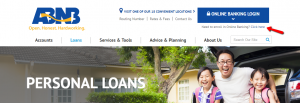
Step 1: Click on the ‘ONLINE BANKING LOGIN’ button.

Step 2: Enter in the required field your User ID and press the ‘Log In’ button. Afterwards, you will also be asked to introduce your password.

Forgot Password / Username
In case you forgot your password, here is a step by step guide regarding how to reset it:
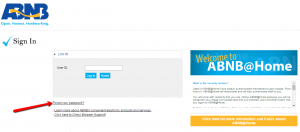
Step 1: Navigate to the credit card’s login page and click on the ‘Forgot your password?’ link.
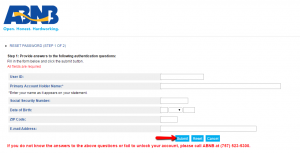
Step 2: In the new window which will open, introduce in the required field the following information: your user ID, primary account holder name, social security number, date of birth, Zip code and email address and click on the ‘Submit’ button. In case you don’t remember some of this information, ANB has made available this phone number: (757) 523-5300 to assist you in your password retrieval/reset.
Activation / Registration
In order to use the online banking you’ll first need to set up a new account/register your card online. Here are the steps you need to follow:
Step 1: From the credit card’s homepage, press ‘Click here’ next to ‘Need to enroll in Online Banking?’ in order to open the registration page.
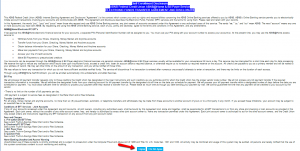
Step 2: After reading the Self-Enrollment Disclosure, click on the ‘I Agree’ button at the bottom of the page.
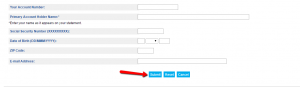
Step 3: In the new window which will open, introduce in the appropriate fields the following information: your account number, primary account holder name, social security number, date of birth, Zip code and email address, and press ‘Submit.’
FAQs
Q: What if I do not know some of the necessary information about my account when filling in the online application form?
If it happens that you have forgot ten some of the information necessary for the opening of your online account, ANB offers this phone number: (757) 523-5300 to assist you and help you find out all the data that is obligatory to enter.
Q: I have changed my home address. Should I inform the bank about that and how can I change it on my account?
In case of the address change, you need to inform the bank, so as to be changed in your personal information that is given to the bank at the moment of the account opening. You can do that by coming to any of the nearest branches and talking to the employees or by logging into your ABNB account online, click on "Your Preferences" and follow the instructions that will lead you to make the necessary changes to your contact information.
Q: How can I change debit and credit card PIN numbers?
There are two different ways of changing the PIN number, and it depends whether it is a debit or a credit card. In order to change the PIN number of your debit card, you should call 1-800-757-9848 from the phone number that is on your account. If you want to change the PIN number on your credit card, you should call 1-866-839-3409 and press option 7 from the phone number.
Permium Credit Card Offers
Compare ABNB Visa Platinum Credit Card
Recently Compared With (by users)
 Bloomingdale’s Credit Card
 Discover it Chrome Student Credit Card
 Chase Amazon Credit Card
 Credit One Cash Back Rewards Visa Credit Card
 AAA Member Rewards Credit Card
 Citi Diamond Preferred Credit Card
 Guitar Center Credit Card
 JetBlue Credit Card
See All Comparisons >>
JetBlue Credit Card
See All Comparisons >>


