


Arvest Classic Visa Credit Card Login | Make a Payment
 Card Info
 Application
Card Rating
Share Your Opinion
Review this card now and let others know your thoughts.
Click here to leave a reviewThe Arvest Classic Visa Credit Card can be managed entirely online. All you need to do is simply login to the Arvest Online Banking platform. In case you have any issues with the login, forgot your username/password or want to enroll online, read below for detailed information.
How to Login / Make a Payment
Here is how to log in to your Arvest Online Banking account:
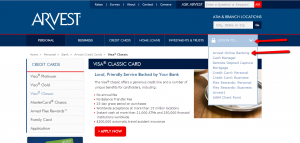
Step 1: From the card’s main webpage, press the ‘LOG IN TO…’ button. A series of options will pop-up in a small window under the login button. Click on the Arvest Online Banking option.
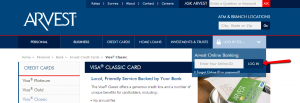
Step 2: Introduce in the appropriate box your Online ID and press ‘LOG IN.’ In the next page you’ll be prompted to enter also your password for your secure login.
Forgot Password / Username
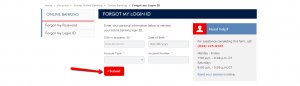
Step 1 (Login ID): Visit the login page and press ‘Forgot my Login ID’ link.
Step 2 (Login ID): Enter your personal information including: your SSN or taxpayer ID, Date of Birth, Account Type and Account Number in the appropriate fields and press ‘Submit.’
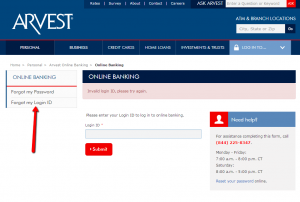
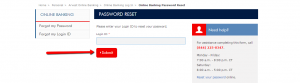
Step 1 (Password): From the login window, press the ‘Forgot my Password’ link as shown in the picture below.
Step 2 (Password): Enter your Login ID in the provided field and press ‘Submit’ in order to reset your password.
Activation / Registration
New customers need to call this number: (866) 952-9523 to enroll in online banking. Currently, all the new users of this credit card cannot enroll to online banking or activate their new cards entirely online.
FAQs
Q: Is there a grace period when using Arvest Classic Visa Credit Card?
Yes, one of the benefits of using Arvest Classic Visa Credit Card is 25 days grace period.
Q: What is the coverage of travel insurance?
The owners of Arvest Classic Visa Credit Card have the benefit of using travel insurance in case of emergency and travel accidents. The coverage is up to $200,000.
Q: What is ArvestGo?
Arvest Go is the new Arvest application for mobile phones and tablets, which offers its customers a completely new mobile banking experience. It is an application that allows you to easily track of your accounts and it can be downloaded on the Apple App Store and Google Play for people who have both an iPhone and Android device.
Q: What does Satisfaction Guarantee stand for?
The owners of Arvest Credit Card have the option of Satisfaction Guarantee which makes you able to get the refund for the product paid by the card in case you are not satisfied with it and the store does not want to accept the return. The refund is only acceptable within 60 days of purchase and it is for the cost of the product up to $250.
Q: What does Baggage Loss Insurance include?
Sometimes, the accidents with your baggage might occur and Arvest offers its clients the baggage lost insurance which includes the coverage of the cost of repairing or replacing your checked luggage if it is lost or damaged. However, the insurance is accepted only if you were traveling on a common carrier and your ticket is paid with your credit card.
Permium Credit Card Offers
Compare Arvest Classic Visa Credit Card
Recently Compared With (by users)
 Dressbarn Credit Card
 USAA Cash Rewards American Express Credit Card
 American Express® Green Card
 Capital One® Venture® Rewards Credit Card
 Zions AmaZing Rewards Credit Card
 Indigo Platinum MasterCard
 Wells Fargo Propel American Express Card
 Ducks Unlimited Visa Credit Card
See All Comparisons >>
Ducks Unlimited Visa Credit Card
See All Comparisons >>


