


Bank of America® Cash Rewards Credit Card Login | Make a Payment
 Card Info
 Application
Card Rating
Share Your Opinion
Review this card now and let others know your thoughts.
Click here to leave a reviewThe Bank of America® Cash Rewards Credit Card offers great cash rewards and an incredible $100 online bonus available on your first purchases. Furthermore, it allows you to easily manage your account online. Below, we will show you how to log in, retrieve your credentials and set up an account.
How to Login / Make a Payment
If you already have an online account, you can sign in by following a few steps:
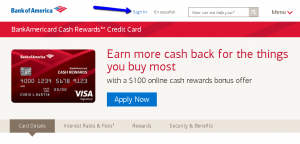
Step 1: From the card’s main web page click on the ‘Sign in’ button. You’ll be directed to another window where you’ll be asked to provide your credentials (Online ID and Passcode) for your secure Sign-in.
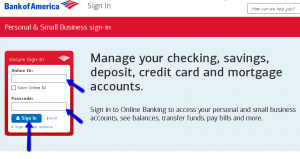
Step 2: Provide your Online ID and Passcode in the appropriate spaces and click the ‘Sign-in’ button.
Forgot Password / Username
In case you cannot remember your Online ID and Passcode, with Bank of America’s secure sign-in it is easy to recover them. Here are some simple steps you have to follow to retrieve your lost Online ID or Passcode.
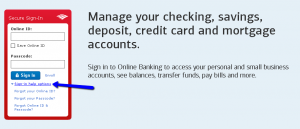
Step 1: Go to the Bank of America Sign-in page and click on the ‘Sign-in help options’. This will open up the three options including ‘Forgot your Online ID?’, ‘Forgot your Passcode?’, and ‘Forgot Online ID & Passcode?’.
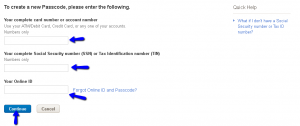
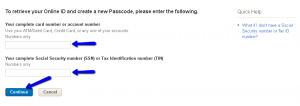
Step 2 (Online ID): Click on the ‘Forgot your Online ID?’ button. This will open another window where you may apply for recovering your Online ID. In the new window provide your
1) ATM/Debit Card number, Credit Card number, or any one of your accounts number.
2) Your complete Social Security number (SSN)/Tax Identification number (TIN) and
3) Your Passcode. Click ‘Continue’.

Step 3 (Passcode): Click on the ‘Forgot your Passcode?’ button. This will open another window where you may apply for recovering your lost password.In the new window provide your
In the new window provide your
1) ATM/Debit Card number, Credit Card number, or any of your accounts number,2)
2) Your complete Social Security number (SSN)/Tax Identification number (TIN) and
3) Your Online ID. Click ‘Continue’.
Step 3 (Online ID and Passcode): In case you forgot both your credentials, click on ‘Forgot Online ID and Passcode’ in the same Sign-in page and introduce
1) Your ATM/Debit Card number, Credit Card number, or any of your accounts number,
2) Full Social Security number (SSN)/Tax Identification number (TIN), and then click ‘Continue.’
Activation / Registration
If you do not have an online account, it is very easy to create one. Here we will guide you through how to complete the required steps to get started with your online banking.
Step 1: From the Sign-in page click on the ‘Enroll’ button. This will open the new page for creating your online banking account.

Step 2: Provide the needed information in the appropriate spaces including
1) Your complete card number or account number (you can use any one of your accounts, credit card or ATM/debit card number),
2) Social Security number (SSN) or Tax Identification number (TIN), and then click on the ‘Continue’ button.

Step 3: From here you’ll be asked to create your unique Online ID and your Passcode for future accessing your online banking.
After creating them click “Continue” again and, in the new window provide your security set-ups by filling all the appropriate fields.
The last step towards the confirmation of your new online account is to review the data you already provided.

FAQs
Q: Who is The BankAmericard cash rewards card good for?
The BankAmericard® Credit Card is a balance transfer credit card and it is the best choice for those people who need a card to transfer their balance. If you pay off your bills regularly on a monthly basis, than this is not a card for you. If it will take you around 18 billing cycles to pay off your credit card debt, the BankAmericard Credit Card is a good option for you.
Q: How safe is Bank of America?
Bank of America, National Association is an FDIC-insured bank which has been operating since 1904. Nowadays it has more than 143,000 full-time employees in 4,637 offices in multiple states. Bankrate announced that Bank of America earned 4 out of 5 stars for safety and soundness.
Q: What is an Overdraft Protection?
An Overdraft Protection is an optional service designed to help prevent declined purchases and other overdrafts if you decide to link your Bank of America account to your credit card. Bank of America will automatically transfer funds from your credit card account to cover any overdraft on your deposit account. It is sufficient that you have available credit on your credit card account. For this service you will need to pay a transaction fee which is 12$.
Permium Credit Card Offers
Compare Bank of America® Cash Rewards Credit Card
Recently Compared With (by users)
 Celebrity Cruises Visa Credit Card
 Associated Bank Visa Platinum Credit Card
 Costco Anywhere Visa® Credit Card
 Lowe’s Consumer Credit Card
 Affinity Credit Union Low Fee MasterCard
 Torrid Credit Card
 Frontier Airlines Credit Card
 KickBack Card
See All Comparisons >>
KickBack Card
See All Comparisons >>


