


Bloomingdale’s Credit Card Login | Make a Payment
 Card Info
 Application
Card Rating
Share Your Opinion
Review this card now and let others know your thoughts.
Click here to leave a reviewBloomingdale’s Credit Card has a great reward points program and a nice online platform where you can manage your account and make payments. On this page, we’ll show you how to log in, what to do if you forgot your password and how to create an online account.
How to Login / Make a Payment
If you already have an online account associated with your Bloomingdale’s Credit Card, here is what you have to do in order to log in.
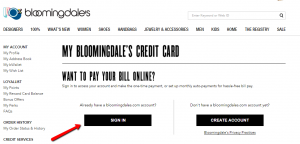
Step 1: Go to the credit card’s main web page and click on ‘SIGN IN’ in order to be able to access the login page.
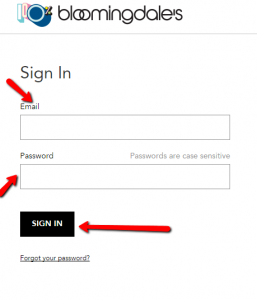
Step 2: Introduce in the required fields your email address and password and press ‘SIGN IN’ in order to access your account and be able to make payments.
Forgot Password / Username
Don’t worry if you forgot your password, it can be recovered very easily. Here is what you should do:
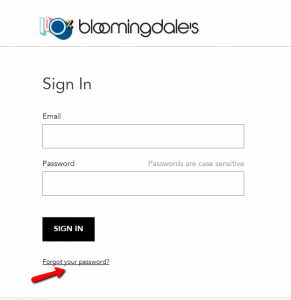
Step 1: Open the credit card’s Sign In page and click on the ‘Forgot your password?’ button.
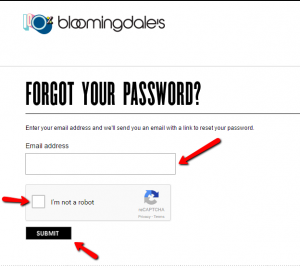
This will lead you to a page where you should provide your email address in order to retrieve the password.
Step 2: Introduce your email address, check the ‘I’m not a robot’ box and click on ‘SUBMIT.’
Activation / Registration
If you are the owner of a Bloomingdale’s credit card, but you do not yet have an online account, here are the steps you need to follow in order to open one:
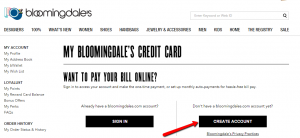
Step 1: Go to the credit card’s main web page and click on the ‘CREATE ACCOUNT’ button.
This will lead you to a page where, after introducing information about you and your card, you will be able to set up an account.
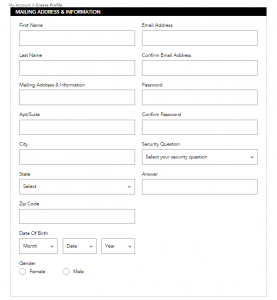
Step 2: Introduce your personal information including first and last name, email address, mailing address (street, apartment/suite, city, state, ZIP code), choose a password, a security question and answer, and provide your date of birth and gender.
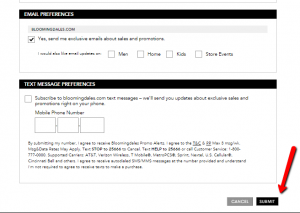
Step 3: Choose whether you would like to receive promotional emails or text messages and press ‘SUBMIT.’
FAQs
Q: What does ‘I’m not a robot’ stand for?
‘I am not a robot’ is a CAPTCHA test which aim is to tell Computers and Humans Apart. The tests are designed so as to be hard for robots and easy for humans so as for the system to be able to differentiate between these two. The users are asked to click a single checkbox or do image-based verification only if necessary. The way you move your mouse on the screen before checking the checkbox differentiate you from a bot which is sometimes enough to predict whether you are human or not.
Q: How safe is the Department Stores National Bank?
Department Stores National Bank, even though it is founded only for Macy’s purpose, is FDIC-insured bank which exhibited a superior condition and earned a full 5 stars for safety according to Bankrate data.
Q: What is the Department Stores National Bank?
Department Stores National Bank is a Citibank subsidiary which offers personal and commercial banking services. It was founded in 2005 and is based in Sioux Falls, South Dakota. Department Stores National Bank is a bank which is run by both Citibank and Macy’s and does not provide services to other department stores.
Q: What is Bloomingdale’s?
Bloomingdale's belongs to Macy’s Inc. and it is a department store which was founded in April 1872. The whole company has 140,000 employees and sells it products in more than 700 department stores under the nameplates Macy’s and Bloomingdale’s.
Permium Credit Card Offers
Compare Bloomingdale’s Credit Card
Recently Compared With (by users)
 AgFed Credit Union Secured Visa Credit Card
 Zions AmaZing Cash Back Credit Card
 Citi® / AAdvantage® Executive World Elite™ Mastercard® Credit Card
 Buckle Credit Card
 Air Force Federal Credit Union Credit Card
 Raymour and Flanigan Credit Card
 Citi Secured Mastercard
 Toys R Us Credit Card
See All Comparisons >>
Toys R Us Credit Card
See All Comparisons >>


