


Chase Ink Plus Business Credit Card Login | Make a Payment
 Card Info
 Application
Card Rating
Share Your Opinion
Review this card now and let others know your thoughts.
Click here to leave a reviewThe Chase Ink Plus Business Credit Card offers not only great benefits in terms of point rewards and signup bonuses but also a facile online platform where you can easily manage your account and make payments. On this page we will teach you how to login, how to retrieve your username and password and how to create an online account.
How to Login / Make a Payment
If you already have an online account associated to your card, here are the steps you have to follow in order to sign in:
Step 1: Open the credit card’s main webpage and click on the ‘Already an Ink customer?’ button.

Step 2: On the upper right side of the page which will open you will find the ‘Log In’ button. Click it and the credit card’s login page will open.

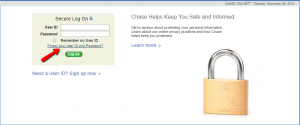
Step 3: Introduce your User ID and Password and press ‘Log On.’ You will now be able to manage your account and make payments from your PC or mobile phone.

Forgot Password / Username
If you forgot your User ID and/or Password, this credit card’s online platform makes it easy to retrieve them. Here is how you should proceed in order to do this:
Step 1: Go the credit card’s login page and click on ‘Forgot your User ID and Password?’ in order to open the credentials retrieval webpage.
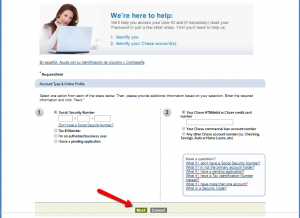
Step 2: Introduce your Social Security Number or Tax ID Number and your Chase ATM/debit or Chase credit card number and click ‘Next.’
Activation / Registration
If you do not yet have an online account, here are the steps you have to follow to open one:
Step 1: Navigate to the credit card’s log in page and press the ‘Need a User ID? Sign up now’ button for opening the registration/activation page.

Step 2: Select the type of accounts you want to access online (personal, business or both), introduce your social security number, choose a User ID and click ‘Next.’
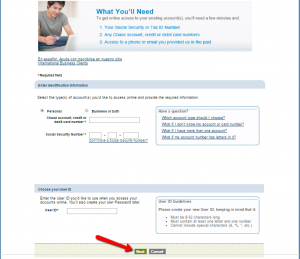
Step 3: You will receive an identification code, and then you will be asked to set up a password, read the legal agreements and details about the card’s services and finally confirm your registration.

FAQs
Q: What does a cell phone protection stand for?
The Ink Business Credit Card from Chase protects your phone and any eligible phones listed on the same bill with a cell phone protection option, but only if the purchase is paid via Chase Ink Plus Business Credit Card. The protection includes the cover of the damage and theft, and it is subject to a $100 deductible per claim and a maximum of three claims per year. The limit is $600 per claim and $1,800 per year. The damage or theft must be reported within 60 days of the incident and you will need to provide all required documentation within 90 days. Otherwise your claim would be denied.
Q: What are the Chase Ink Plus Business Credit Card best features?
Chase Ink Plus Business Credit Card is a good card with numerous benefits, advantages and positive features. Besides having incredible up to 80,000 point signup bonus and great reward points, such as three points for every $1 spent on travel and other select purchases and one point per $1 on all other purchases, it also provides card members with trip cancellation and trip interruption insurance, auto rental collision damage waivers, cell phone insurance for the primary cardholder and employee phones on the same account, employee cards at no additional cost, purchase, price, return and extended warranty protection, as well as no foreign transaction fees.
Permium Credit Card Offers
Compare Chase Ink Plus Business Credit Card
Recently Compared With (by users)
 USAA Cash Rewards American Express Credit Card
 Westpac Altitude Credit Card
 Buckle Credit Card
 Discover it® Student Cash Back
 Amex Blue Cash Everyday Credit Card
 Hilton Honors American Express Card
 Cabela’s Club Visa Credit Card
 PNC Core Visa Credit Card
See All Comparisons >>
PNC Core Visa Credit Card
See All Comparisons >>


