


Chase Sapphire Preferred Credit Card Login | Make a Payment
 Card Info
 Application
Card Rating
Share Your Opinion
Review this card now and let others know your thoughts.
Click here to leave a reviewBesides the amazing point rewards program and generous signup bonuses, the Chase Sapphire Preferred Credit Card offers, its holders can also benefit from a facile online system where they can manage their accounts. Here, we will show you how to log in, how to retrieve your credentials and how to set up a new account.
How to Login / Make a Payment
If you already opened an account online, this is what you need to do to log in:
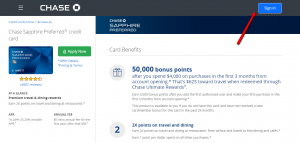
Step 1: On the upper right side of the card’s homepage, click on the ‘Sign In’ button to open the login page.
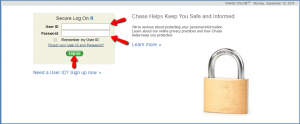
Step 2: Provide your User ID and password and press ‘Log On.’
Afterwards, you will be able to easily manage your account and make payments.
Forgot Password / Username
Do not despair if you forgot your user ID and/or password, the online system provides you a simple way to retrieve them.
Here is how you need to proceed.
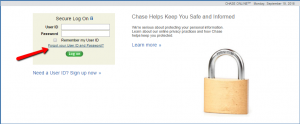
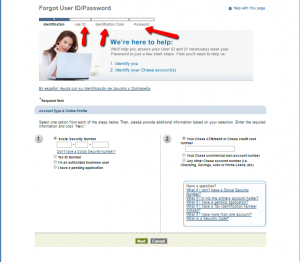
Step 1: In the card’s login page, click on ‘Forgot your User ID and Password?’ for opening a window where you can retrieve your lost credentials.
Step 2: Introduce your Social Security Number or Tax ID Number and your credit card number and press ‘Next.’
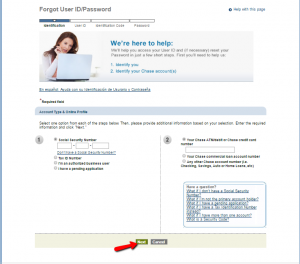
Step 3: Now you will be able to locate your User ID and you’ll receive an identification code and the possibility to reset your password.
Activation / Registration
If you don’t have an online account already, here is how to set up one:
Step 1: Go to the card’s login page and click on ‘Need a User ID? Sign up now’ for opening the registration page.
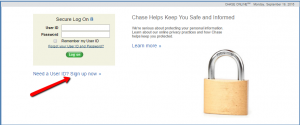
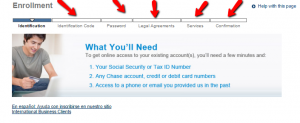
Step 2: Enter your account number, social security number, choose your User ID and click ‘Next.’

Step 3: You’ll be provided an identification code and, after choosing a password and reading and confirming the legal agreements and services associated with this card the registration process is complete.
FAQs
Q: I am trying to find an e mail or mailing address to contact them, but I cannot find it.
In order to contact them via e-mail, you must login to your account to be able to send email. If you want to send them mail, you will need to look for the nearest branch and find its address. You can look it up on the website: https://locator.chase.com/?advanced=true.
Q: What do Chase Ultimate Rewards include?
When you are using Chase Sapphire Preferred credit card, you earn Ultimate Rewards points which belong to Chase’s point program. The achieved points can be used for travel, gift cards, merchandise, and statement credit. Chase Sapphire points can be transferred for high value redemptions on United, British Airways, Korean Air, Hyatt and many more partners. You do not have any international fees and can even get double points on everything related to travel and food.
Q: What does 25% more in travel redemption stand for?
Chase Ultimate Rewards offer you the option to get 25% more value when you redeem the points for airfare, hotels, car rentals and cruises. This means that if you redeem points for cash, each point is worth one cent. However, the point you redeem for travel booked through Chase Ultimate Rewards is worth $.0125 which means that points are worth 25% more.
Permium Credit Card Offers
Compare Chase Sapphire Preferred Card
Recently Compared With (by users)
 Lowe’s Consumer Credit Card
 ABNB Visa Platinum Rewards Credit Card
 Good Sam Camping World Visa Credit Card
 Gordmans Credit Card
 Air Force Federal Credit Union Credit Card
 The Platinum Card® from American Express
 Zions AmaZing Low Rate Credit Card
 Union Plus Credit Card Rate Advantage
See All Comparisons >>
Union Plus Credit Card Rate Advantage
See All Comparisons >>


