


Discover it® Student Cash Back Login | Make a Payment
 Card Info
 Application
Card Rating
Share Your Opinion
Review this card now and let others know your thoughts.
Click here to leave a reviewThe Discover it® Student Cash Back offers great cash back rewards and the possibility to easily manage your account and make payments through a convenient online system. Below you’ll find details on how to log in, how to retrieve your credentials and how to set up an online account.
How to Login / Make a Payment
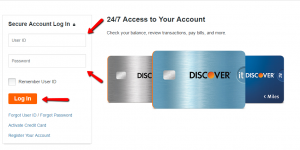
In case you have an online account associated with your card, this is what you need to do in order to access it:
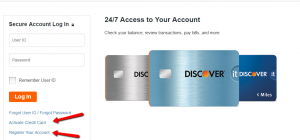
Step 1: Open the credit card’s authentication page, introduce your User ID and Password and click “Log In”.
Forgot Password / Username
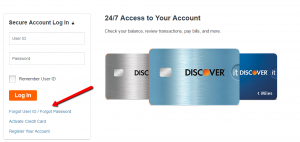
Should you forget your User ID or password, do not worry, in a few simple steps, you can retrieve them.
Step 1: In the login web page click on ‘Forgot User ID’ or ‘Forgot Password.’
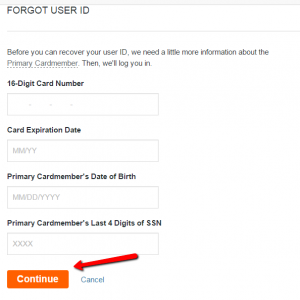
Step 2 (User ID): If you forgot your User ID, introduce in the appropriate fields your 16-digit card number, the card’s expiration date, the primary cardmember’s date of birth and the primary cardmember’s last four digits of his/her social security number.
Then press ‘Continue.’
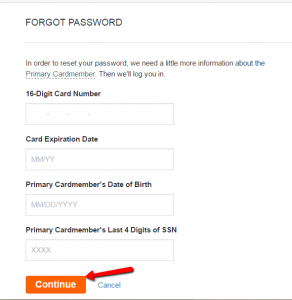
Step 2 (Password): In case you forgot your password, enter in the required fields your card’s 16-digit card number, its expiration date, the primary cardmember’s date of birth and last four digits of the social security number and click ‘Continue.’
Activation / Registration
If you got a Discover It Student Credit Card but you did not yet create an online account, check out the details below on how to activate and register your card.
Step 1: First you will need to activate your card.
Click on ‘Activate Credit Card’ in the login web page.
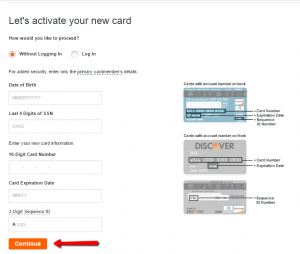
Step 2: Enter your date of birth, the last 4 digits of your social security number, your credit card’s number and expiration date, its 3-digits sequence ID and press ‘Continue.’
After your card is activated, go back to the login page and click on ‘Register Your Account.’
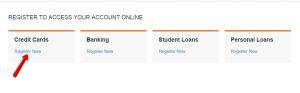
Step 3: In the page which will open, click on ‘Register Now’ under ‘Credit Cards.’
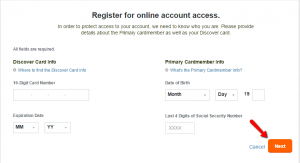
Step 4: Provide your 16 digit card number and its expiration date, as well as your date of birth and last 4 digits of your social security number.
Afterwards, click ‘Next.’
FAQs
Q: What is a 3-digits sequence ID?
The 3-digits sequence ID is a card security code which can be located both on the back and at the front of the credit card, depending on the issuer. It can be found on the back of MasterCard, Visa, Discover, Diners Club, and JCB credit or debit cards and it is usually written to the right of the signature strip. It is a security feature with the aim to reduce the credit card fraud especially in situations where a PIN cannot be used.
Q: Do I need to be a student to apply for Discover it Student Credit Card?
Yes. Unlike some of the cards that has the word “student” in their names but do not demand to be a student in order to have it, one of the Discover it Student Credit Card application conditions is to be enrolled in a college or university.
Q: What kind of benefits does Discover it Student Credit Card offer that other student cards do not?
Discover it Student Credit Card offers some of the benefits not offered by other student credit cards such as $20 cash back each school year your if your GPA is 3.0 or higher for up to the next 5 years, you can get an unlimited dollar-for-dollar match of all the cash back you've earned at the end of your first year and up to the quarterly maximum each time you activate at different places like gas stations, grocery stores, restaurants or Amazon.com.
Permium Credit Card Offers
Compare Discover it® Student Cash Back
Recently Compared With (by users)
 Spirit Airlines MasterCard Credit Card
 Bassett Furniture Credit Card
 Westpac Altitude Credit Card
 Bergner’s Credit Card
 ABNB Visa Platinum Credit Card
 Chase Sapphire Preferred Card
 Arvest Platinum Credit Card
 Dressbarn Credit Card
See All Comparisons >>
Dressbarn Credit Card
See All Comparisons >>


