


PNC Core Visa Credit Card Login | Make a Payment
 Card Info
 Application
Card Rating
Share Your Opinion
Review this card now and let others know your thoughts.
Click here to leave a reviewIn order to take advantage of the PNC Core Visa Credit Card’s many benefits, you will need to create an online account. Below, we will guide you through the process of logging in, retrieving your credentials in case you lost them and setting up an online account
How to Login / Make a Payment
In case you have already created your online banking account, here is how to log in:
Step 1: Go to your credit card’s main page and click on the ‘Login’ button. This will open a small pop-up window where you can log-in to your account.
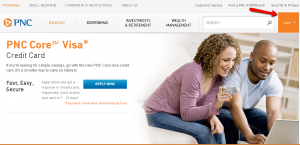
Step 2: Enter your USER ID and then click ‘Login.’

Forgot Password / Username
The site allows you to memorize your USER ID by simply selecting the ‘Save USER ID’ box at the pop-up window after you first enter your credentials.
By enabling the ‘Save User ID’ and successfully signing on to ‘Online Banking’, the last 4 characters of your User ID will be displayed in the ‘Sign On’ box for future sessions.
However, in case you forgot your USER ID or Password, there are a few steps to follow in order to retrieve them:
Step 1: Click on the ‘Forgot your USER ID or Password?’ button. A new window with instructions on how to retrieve your credentials will open.

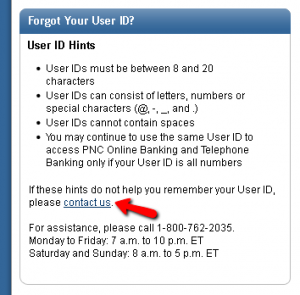
Step 2 (USER ID): If you forgot your USER ID first take a look at the hints (such as the number of digits that the USER ID may include and the allowed characters/numbers you may have used), which can help you remember your ID.
If you still cannot remember it, by clicking on the ‘contact us’ button you will get access to a phone number which you can call for further assistance.
Step 2 (Password): If you forgot your password you can reset it by clicking ’Reset your Password’ in the same window.
In order to do so, you will need to provide your PNC User ID, your Social Security or Tax Identification Number, one of your full PNC account numbers and your personal account debit card and PIN or a phone number you previously provided.

Activation / Registration
If you do not have already an online account here is how to set-up one and activate/register your card:
Step 1: In the login pop-up window click on the ‘Personal’ button.
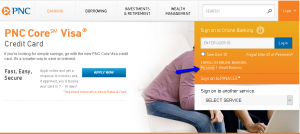
Step 2: After reading the requirements and having all the needed information at hand, press the ‘Get Started’ button.

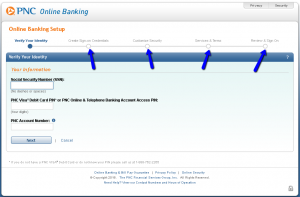
Step 3: Introduce the required information including your Social Security Number (SSN), your PNC Visa Debit Card PIN or PNC Online & Telephone Banking Account Access PIN (four digits) and your PNC Account Number into the appropriate fields and click ‘Next.’

Step 4: After you verified your identity, you’ll be asked to create a username and password, customize your security.
Finally, after reading carefully the Services & Terms and reviewing all the data you introduced until now, you’ll be able to Sign On to your new account.
FAQs
Q: What is PNC Bank?
PNC Bank NA belongs to the PNC Financial Services Group, Inc. which is located in Pittsburgh, Pennsylvania but possesses 2,520 branches in Alabama, Delaware, the District of Columbia, Florida, Georgia, Kentucky and many other U.S. states. The PNC Financial Services Group, Inc. has 9,024 ATMs and it specializes in financial businesses services. It is the fifth largest bank by number of branch offices in the U.S. For more than 160 years, it has provided their clients, from individuals and small businesses, to corporations and government entities, with great service and powerful financial expertise to help them reach success.
Q: How safe is PNC bank?
The PNC Bank is FDIC-insured bank which started in 1804 and today has 51,679 full-time employees in 2,581 offices. The bank works hard in providing the easiest way to help customers achieve financial well-being. According to Bankrate, it exhibited a good condition, earning 4 out of 5 stars for safety since more than 8 million consumers and small businesses use the bank services for various deposit, lending, credit card, cash management and investment.
Q: What are the hints for a good User ID?
When you open an online account, you need to make User ID and Password. Some of the hints for making the good User ID are that it must be between 8 and 20 characters long, which would be the combination of numbers, letters and special characters and it cannot contain spaces.
Permium Credit Card Offers
Compare PNC Core Visa Credit Card
Recently Compared With (by users)
 Citi Diamond Preferred Credit Card
 Home Depot Credit Card
 Discount Tire Credit Card
 ABNB Visa Platinum Credit Card
 Tires Plus Credit Card
 UMB Visa Credit Card
 State Farm Good Neighbor Visa Credit Card
 Associated Bank Visa Bonus Plus Rewards Credit Card
See All Comparisons >>
Associated Bank Visa Bonus Plus Rewards Credit Card
See All Comparisons >>


