


Target Red Card Credit Card Login | Make a Payment
 Card Info
 Application
Card Rating
Share Your Opinion
Review this card now and let others know your thoughts.
Click here to leave a reviewIf you are already approved for amazing Target Red Card Credit Card – you are the lucky one because you can start saving money right now – just activate your card online and log into your account. Don’t know how to do it? Then this guide is created especially for you. After reading this article you will be able to manage your account easily without any help.
How to Login / Make a Payment
Step 1 – Visit Target website. After you are there, click on ‘Manage my REDcard’ button.

Step 2 – Then you will see two more options. Choose ‘login’ now.

Step 3 – Enter your Username and Password and press ‘Sign In’ after that. After you finish these 3 simple steps you must be successfully logged in. If something went wrong – keep reading.

Forgot Password / Username
Step 1 – If you want to reset your Username or Password, press ‘manage my REDcard’ on Target’s website.
Step 2 – Now you will have to choose ‘login’ button again.
Step 3 – On the next page, right under the login form you will find a button, called ‘Forgot your Username/Password?‘. Find it and press it.

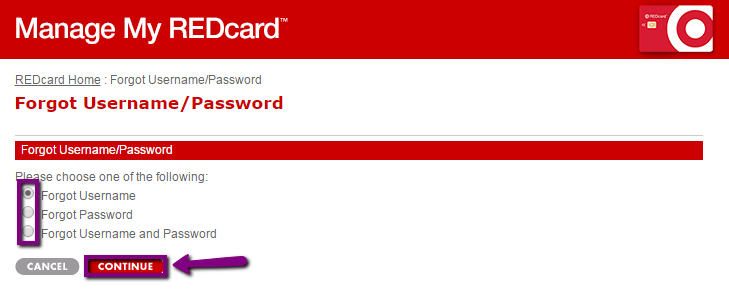
Step 4 – On the next step, you will have to choose one of the following options. If you have forgotten your Username, click ‘Forgot Username‘, then press ‘Continue‘ and go to the next step.
If you have forgotten your password, choose ‘Forgot Password’ and go to the Step 6. But if you’ve forgotten both Password and Username, choose the last option and go directly to the Step 7.
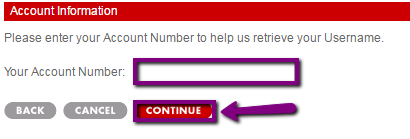
Step 5 – In order to reset your Username, you will have to enter your account number. Do that and press ‘Continue‘.
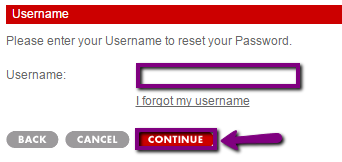
Step 6 – If you have forgotten your Password, enter your Username and press ‘Continue’.
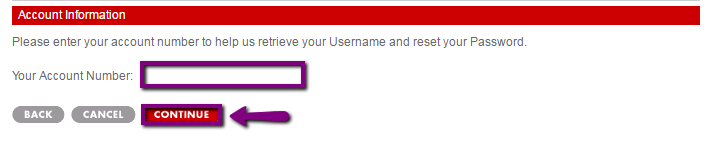
Step 7 – If you don’t remember your Password and Username, just enter your Account Number and press ‘Continue‘.
Activation / Registration
Step 1 – Registration process is quite easy at Target. The first thing you have to do – is to visit Target’s website.
When you are there, press ‘manage my REDcard‘.

Step 2 – Under the sign-in form you will find ‘First Time Here?Enroll’ button. Select it.

Step 3 – In order to start your registration process enter your Card Number into the field. Then re-enter it and press ‘Continue’.

To complete your registration you will have to create your Username/Password and to enter some Personal Information.
FAQs
Q: What is Target Red?
Target Corporation is the second-largest discount store retailer in the United States and the first Target discount store was opened in Roseville, Minnesota in 1962. The company developed and introduced new store formats under the Target brand in the 1990s. Target.com owns and oversees the company's e-commerce initiatives and operates 1,834 stores throughout the United States.
Q: Do you automatically increase credit limits on my Target Red credit card accounts or do I have to ask for it?
The issuer periodically reviews accounts to determine whether it is good enough for automatic increasing of the credit limit. However, if you think that you are eligible for it, you can always visit one of the branches and get informed about the possibility of increment.
Q: I pay my account bills online, but I receive the paper statement yet. Is that fine?
This is a normal situation. Paper statements will be sent via mail unless you select not to receive paper statements any more by visiting the official website and under the menu Settings you should click on Statement Delivery Method and Switch to Online View Only. You will be asked some security questions to prove your identity in order to be allowed to make changes.
Permium Credit Card Offers
Compare Target Red Card Credit Card
Recently Compared With (by users)
 Alliant Visa Platinum Rewards Credit Card
 Military Star Credit Card
 Zions AmaZing Low Rate Credit Card
 Fidelity Rewards Visa Signature Credit Card
 Williams-Sonoma Credit Card
 Zales Credit Card
 Priceline Rewards Credit Card
 Exxon-Mobil Business Credit Card
See All Comparisons >>
Exxon-Mobil Business Credit Card
See All Comparisons >>


This information is wrong! I just want to make my payment and I cannot do it my Username has a capital in it and the system will not recognize it!
VERY HARD TO USE THIS NOW!