


U.S. Pride BankAmericard Credit Card Login | Make a Payment
 Card Info
 Application
Card Rating
Share Your Opinion
Review this card now and let others know your thoughts.
Click here to leave a reviewCardholders of the U.S. Pride BankAmericard Credit Card can manage their account just by logging in to their online banking account. Should you have concerns about logging in to your online banking account, forgot your username or password or need to activate your new card here you’ll find all the information you need.
How to Login / Make a Payment
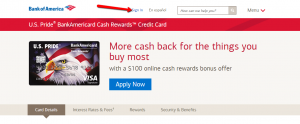
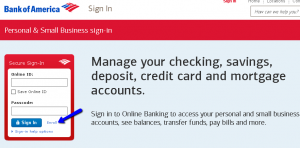
Step 1: Visit the card’s main webpage or the Bank of America homepage and click on the ‘Sign in’ button.
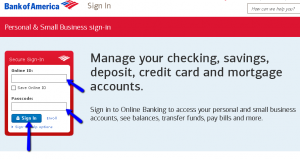
Step 2: Introduce your Online ID and Passcode in the boxes provided and click on the ‘Sign-in’ button.
Forgot Password / Username
If it happened to forget your Online ID or/and Passcode, with Bank of America’s secure sign-in it is easy to recover/reset them. Here is what you should do:
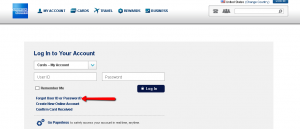
Step 1: Go to the Bank of America Sign-in page and click on the ‘Sign-in help options.’ This will open up the three options including ‘Forgot your Online ID?’, ‘Forgot your Passcode?’, and ‘Forgot Online ID & Passcode?’
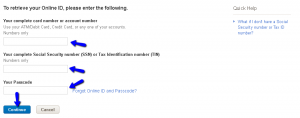
Step 2 (Online ID): Click on the ‘Forgot your Online ID?’ button. In the new window provide your 1) ATM/Debit Cardnumber, Credit Cardnumber, or any one of your accounts number, 2) your complete Social Security number (SSN)/Tax Identification number (TIN) and 3) your Passcode. Click ‘Continue’.
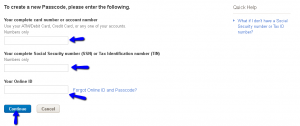
Step 3 (Passcode): From the same Sign-in page, press the ‘Forgot your Passcode?’ button. Provide 1) your ATM/Debit Cardnumber, Credit Cardnumber, or any of your accounts number, 2) your complete Social Security number (SSN)/Tax Identification number (TIN) and 3) your Online ID. Proceed by clicking ‘Continue.’
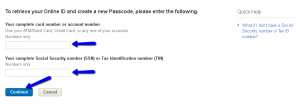
Step 4 (Online ID and Passcode): Should you forget both your Online ID and Passcode, press the ‘Forgot Online ID and Passcode’ from the Sign-in page and introduce 1) your ATM/Debit Cardnumber, Credit Cardnumber, or any of your accounts number, 2) your full Social Security number (SSN)/Tax Identification number (TIN), and then click ‘Continue.’
Activation / Registration
You can get started with your online banking account by following these steps:
Step 1: From the Sign-in page click on the ‘Enroll’ button.
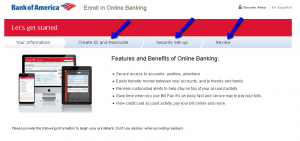
Step 2: Provide in the appropriate spaces the required information including: 1) Your complete card number or account number (you can use any one of your accounts, credit card or ATM/debit card number), 2) your Social Security number (SSN) or Tax Identification number (TIN). Afterwards, click on the ‘Continue’ button.

Step 3: Create your unique Online ID and your Passcode for future accessing your online banking. After that you can set up your security questions and review your provided data.
FAQs
Q: Are the penalties really so high when it comes to the U.S. Pride BankAmericard Credit Card?
Yes, and that is one of the drawbacks of this card. Bank of America charges up to $38 as late payment fees and $27.00 as returned payment fees. In case of a late payment, you will need to pay a penalty APR of up to 29.99% variable.
Q: What is shown in my credit report?
A credit report is a document issued by the credit bureaus which helps credit card issuers determine whether you are eligible for the card or not depending on your credit history. Credit report includes the data about your regular payments on time, how much credit you have available and how much credit you are using, did you have some illegal actions or was irresponsible credit user. It is the compilation of all credit reports given by the lenders, such as banks, creditors, department stores. They create your credit reports according to the information that are sent to them.
Q: I am asked to enable cookies in my browser when I tried to enter the online banking system.
Yes, this is a normal situation, since the enabling of cookies in your browser makes you easily access online banking and the card issuer can get you to the right page and help you log in as quickly as possible.
Permium Credit Card Offers
Compare U.S. Pride BankAmericard Credit Card
Recently Compared With (by users)
 Platinum Credit Card from Capital One®
 ASU Platinum Credit Card
 Upromise Mastercard Credit Card
 Dillard’s Credit Card
 Priceline Rewards Credit Card
 Shell Platinum Credit Card
 Discount Tire Credit Card
 Capital One® Quicksilver® Cash Rewards Credit Card
See All Comparisons >>
Capital One® Quicksilver® Cash Rewards Credit Card
See All Comparisons >>


