


Zions AmaZing Cash Back Credit Card Login | Make a Payment
 Card Info
 Application
Card Rating
Share Your Opinion
Review this card now and let others know your thoughts.
Click here to leave a reviewThe Zions AmaZing Cash Back Credit Card offers not only a great cash back rewards system but also a convenient and easy-to-handle online platform where you can manage your account and make payments. On this page, we will show you how to log in, how to retrieve your password and how to set up an online account.
How to Login / Make a Payment
If you already set up an online account, here is how you can access it:
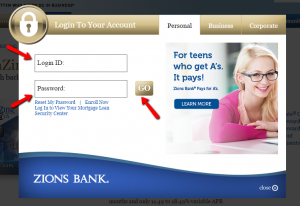
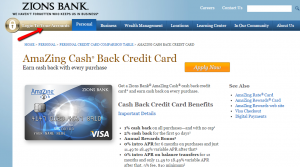
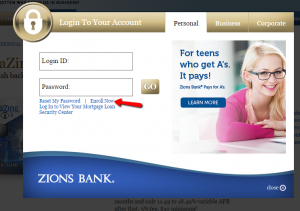
Step 1: Go to the credit card’s main page and click on ‘Login to Your Accounts’ to open a pop-up page where you can introduce your credentials.

Step 2: Introduce in the appropriate spaces your Login ID and your Password and press ‘GO.’
Forgot Password / Username
In case you forgot your password you can reset it very easily by following these steps:
Step 1: In the credit card’s main web page click on ‘Login to Your Accounts.’
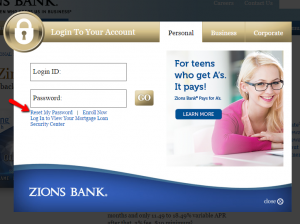
Step 2: In the pop-up login page, click on ‘Reset My Password.’
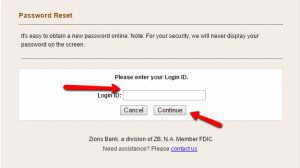
Step 3: Enter your Login ID and click on the ‘Continue’ button.
Activation / Registration
If you got a Zions AmaZing Cash Back Credit Card, we advise you to associate it immediately with an online account so you can easily make payments and other operations online. Here are the steps you should follow to set up an online account:
Step 1: Open the credit card’s homepage and click on ‘Login to Your Accounts.’

Step 2: Click on the ‘Enroll Now’ button in the login pop-up window to open the enrollment page.
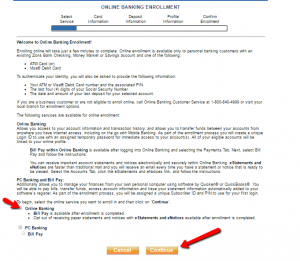
Step 3: Choose between Online Banking and PC Banking. We recommend you to choose Online Banking since it offers all the benefits of PC Banking, plus the option to receive eStatements and eNotices. After selecting your option, click ‘Continue.’
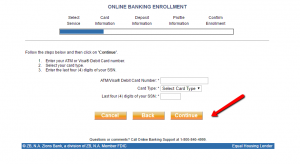
Step 4: Enter your card number, card type and last 4 digits of your Social Security Number and press ‘Continue.’
Step 5: Provide your deposit information, profile information (including a username and password) and confirm your enrollment.

FAQs
Q: What is Zions?
Zions First National Bank was founded in Salt Lake City in 1873 with the aim to help the individuals, small-to middle-market businesses, nonprofits, corporations and institutions in traditional banking and innovative technology services. Since its foundation, Zions Bank is a consistent market leader in US Small Business Administration and it has developed into a company which operates in 500 local financial centers across 11 Western states: Arizona, California, Colorado, Idaho, Nevada, New Mexico, Oregon, Texas, Utah, Washington and Wyoming where it has more than 200 ATMs.
Q: How safe is Zions Bank?
Zions Bank, located in Salt Lake City, is an FDIC-insured bank which was founded in 1873 and it has 10,007 employees in 444 offices in multiple states. According to Bankrate, ZB National Association exhibited a good condition, and earned 4 out of 5 stars for safety and soundness.
Q: What does Visa Account Updater stand for?
Visa Account Updater is the service offered to all Visa credit card owners which is used to automatically update your card expiration date or replacement card number to the merchants who maintain your card information on file for your purchases or payments. That way, customer satisfaction and loyalty is facilitated considering the fact that it exchanges updated account information between merchants and Visa card issuers. This service is completely free of charge.
Permium Credit Card Offers
Compare Zions AmaZing Cash Back Credit Card
Recently Compared With (by users)
 David’s Bridal Credit Card
 BankAmericard Better Balance Rewards Credit Card
 Barclaycard Ring Mastercard
 Ann Taylor Credit Card
 Amex Blue Sky Credit Card
 Hilton Honors American Express Card
 Fidelity Rewards Visa Signature Credit Card
 Lowe’s Business Rewards Credit Card
See All Comparisons >>
Lowe’s Business Rewards Credit Card
See All Comparisons >>


