


American Express Business Gold Rewards Credit Card Login | Make a Payment
 Card Info
 Application
Card Rating
Share Your Opinion
Review this card now and let others know your thoughts.
Click here to leave a reviewHolders of the American Express Business Gold Rewards Credit Card have the possibility to access their account easily online by simply logging-in at the American Express online banking platform. Should you have any issues with the login, user ID or password or simply need to activate your new card, here we provide information regarding all these steps.
How to Login / Make a Payment
Step 1: Navigate to the card’s main page and click on the ‘Log In’ button at the top-right corner of the window.
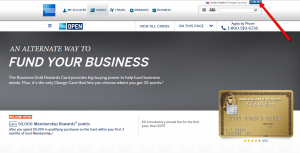
Step 2: In the new opened page enter your User ID and Password and then click the “Log In” button. Congratulations, you are now logged in to your online account.

Forgot Password / Username
Should you forget the User ID or Password, you can retrieve them easily from the American Express ‘Log In’ page.
Step 1: Press the ‘Forgot User ID or Password’ link as shown in the picture below.

Step 2: Provide the required information including the 15-digit card number and the 4-digit card ID number. Click on the ‘Continue’ button to retrieve your User ID and Password.

Step 3: Complete the next pages related to your User ID retrieval, verification of your ID and update your password.

Activation / Registration
In case you are having concerns on how to activate your online account, follow our step-by-step guide below to learn more on the online activation or registration of your new card:
Step 1: From the same login page, click on the ‘Create New Online Account’ right under the ‘Forgot User ID or Password’ link.

Step 2: Enter your card information including your 15-digit card number as well as the 4-digit card ID number. Click on the ‘Continue’ button. In the next steps you can set up your account preferences as well as customize your card benefits by reading and checking the relevant information and completing all the required fields. To complete your account activation/card registration click on ‘Continue.’

FAQs
Q: How can I earn 50,000 Membership Rewards points?
The American Express Business Gold Rewards credit card owners have a chance to earn 50,000 Membership Rewards points once they open their account and spend $5,000 in qualifying purchases during the first 3 months if they are paid by the card.
Q: What are the reward points of the American Express Business Gold Rewards credit card?
There is a great reward point system when the American Express Business Gold Rewards credit card is concerned. Firstly, you are allowed to choose the category from which you want to earn 3 points per $1 spent. There are five categories, including airfare purchased directly from airlines, U.S. purchases at gas stations or U.S. computer hardware, software and computing purchases. Then, you can earn 2 points per $1 spent on remaining categories, and there are four of them. Finally, you can earn 1 point per $1 spent on all other purchases paid by the American Express Business Gold Rewards credit card.
Q: Is there a possibility to earn points faster?
The pace of your point earning depends exclusively on your purchases. The more you use your American Express Business Gold Rewards credit card for eligible or any other daily purchases instead of cash or other means of payment, the more points will add to your points balance.
Permium Credit Card Offers
Compare American Express Business Gold Rewards Credit Card
Recently Compared With (by users)
 Walmart Credit Card
 Virgin Atlantic MasterCard Credit Card
 ABNB Mastercard Platinum Credit Card
 J Crew Credit Card
 PNC Core Visa Credit Card
 Westpac Altitude Credit Card
 Continental Finance Surge Credit Card
 Arvest Classic Visa Credit Card
See All Comparisons >>
Arvest Classic Visa Credit Card
See All Comparisons >>


