


ASU Platinum Credit Card Login | Make a Payment
 Card Info
 Application
Card Rating
Share Your Opinion
Review this card now and let others know your thoughts.
Click here to leave a reviewThe ASU Platinum Credit Card has an easy-to-use online platform as well as a MidFirst Bank Mobile App. Read our guide for information on your online login, password retrieval assistance and first enrollment to online banking.
How to Login / Make a Payment
If you have already opened an online account connected to your MidFirst Bank ASU Platinum Credit Card, you can access it online to manage your credit and make payments by following these steps:
Step 1: Navigate to the card’s homepage or the MidFirst Bank main webpage and insert your online Banking ID in the provided space located at the top of your screen. Afterwards, simply press the ‘Log In’ button.

Forgot Password / Username
Should you have any problems with your online banking access you can follow the steps below:
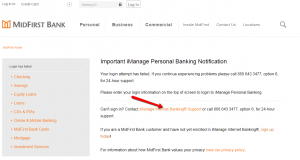
Step 1: In case your login attempts have failed, a page with the methods you can follow for re-establishing access to your account (phone assistance or online assistance) will open. Press the iManage Internet Banking® Support link as shown below for online support.
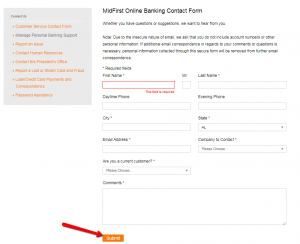
Step 2: Fill in the required information in the MidFirst Online Banking Contact Form and insert your specific concern about online banking access in the comments’ box. Press ‘Submit’ to forward your message to the bank.
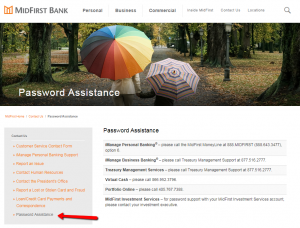
Step 3: In case you experienced problems with your password, press the ‘Password Assistance’ button in the current window. You’ll be able to get a list of phone numbers you can call for assistance regarding your password.
Activation / Registration
Self-Enrollment in iManage Personal Banking is easy and only takes about 5 minutes. To do so you need to follow these steps:
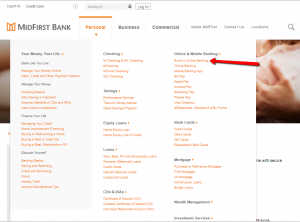
Step 1: From the MidFirst Bank homepage open the ‘Personal’ menu and then click on the Enroll in Online Banking option as shown in the picture below.
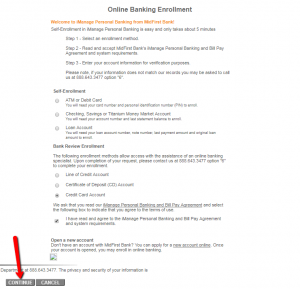
Step 2: Select the ‘Credit Card Account’ option under the Bank Review Enrollment. Read the iManage Personal Banking and Bill Pay Agreement and select the following box to indicate that you agree to the terms of use. Press the ‘Continue’ button to access the enrollment page.
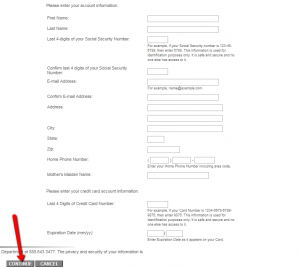
Step 3: Enter in the appropriate space the required information including your: first name, last name, last 4 digits of your social security number, email address, home address, city, state, Zip code, home phone number, mother’s maiden name, last 4 digits of your credit card’s number and the card’s expiration date. Press ‘Continue.’
Note: The Bank Review Enrollment method related to Line of Credit Account / Certificate of Deposit (CD) Account / Credit Card Account allows access with the assistance of an online banking specialist. Upon completion of your request, please contact 888.643.3477 option “6” to complete your enrollment.
FAQs
Q: What is the MidFirst Bank?
MidFirst Bank is the United States privately owned bank, located in Oklahoma City, Oklahoma which has been operating since its foundation in 1911. It offers private banking and mortgage banking products and services. The bank currently holds loans worth $10.45 billion, including $9.25 billion worth of real estate loans.
Q: Is MidFirst Bank safe?
MidFirst Bank is an FDIC-insured bank with approximately 2,479 employees. It is in a superior condition, earning a full 5 stars for safety.
Q: What does ASU stand for?
ASU is the acronym for the Arizona State University, a research university on five campuses and four regional learning centers throughout Arizona. By the 2018, ASU has created the nation's most innovative higher education programs.
Q: Will the usage of the ASU Platinum Credit Card help the Arizona State University?
Yes, current, old and new students of the Arizona State University are advised to apply for this amazing card in order to be able to use all the benefits it offers.
Q: Is there a mobile application for ASU Platinum Credit Card owners?
Yes, there is MidFirst Bank Mobile Application available for Android users! MidFirst Bank Mobile allows you to check balances, make transfers, pay bills, and fulfill all the other banking obligations from your home by just a few simple clicks on your mobile or tablet device.
Permium Credit Card Offers
Compare ASU Platinum Credit Card
Recently Compared With (by users)
 Chevron VISA Card
 Discover it Chrome Student Credit Card
 Crate and Barrel Credit Card
 Toys R Us Credit Card
 Amex Blue Cash Everyday Credit Card
 Torrid Credit Card
 Barneys New York Credit Card
 Carnival Cruises Credit Card
See All Comparisons >>
Carnival Cruises Credit Card
See All Comparisons >>


