


BankAmericard Better Balance Rewards Credit Card Login | Make a Payment
 Card Info
 Application
Card Rating
Share Your Opinion
Review this card now and let others know your thoughts.
Click here to leave a reviewThe BankAmericard Better Balance Rewards Credit Card is a good option for earning while managing your credit card’s balance. You can also easily manage your account online. If you want to learn more the online operations follow our guide on how to log in, retrieve your credentials and set up an account.
How to Login / Make a Payment
If you already opened an online account, you can sign in by following a few steps:
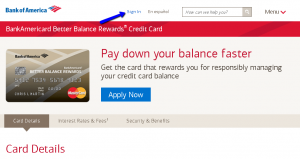
Step 1: From the card’s homepage click on the ‘Sign in’ button. You’ll be directed to another window where you’ll be asked to provide your Online ID and Passcode for your secure Sign-in.
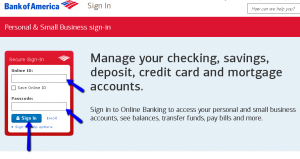
Step 2: Introduce your Online ID and Passcode in the required spaces and click the ‘Sign-in’ button.
Forgot Password / Username
If you cannot remember your Online ID and Passcode, with Bank of America’s secure sign-in it is easy to recover them. Here are some simple steps you have to follow to retrieve your lost Online ID or Passcode:
Step 1: From the Bank of America Sign-in page click on the ‘Sign-in help options’ link.
You will have to select between three options: ‘Forgot your Online ID?’, ‘Forgot your Passcode?’, and ‘Forgot Online ID & Passcode?’

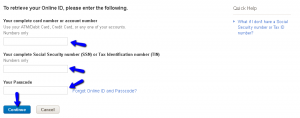
Step 2 (Online ID): Click the ‘Forgot your Online ID?’ link. In the newly opened window, you can apply for recovering your Online ID. Provide your 1) ATM/Debit Card number, Credit Card number or any one of your accounts number, 2) a complete Social Security number (SSN) or your Tax Identification number (TIN) and 3) your Passcode. Then, click ‘Continue’.
Step 3 (Password): To recover your password, click on the ‘Forgot your Passcode?’ link.
This will open another window where you can apply for recovering your lost password. Introduce your ATM/Debit Card number, Credit Card number, or any of your accounts number, your complete Social Security number (SSN)/Tax Identification number (TIN) and your Online ID. Click ‘Continue’.

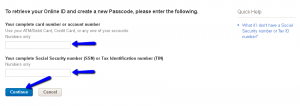
Step 3 (Online ID and Passcode): If you cannot remember any of your credentials, click on ‘Forgot Online ID and Passcode’ link in the same Sign-in page.
Introduce your ATM/Debit Card number, Credit Card number, or any of your accounts number, your full Social Security number (SSN)/Tax Identification number (TIN), and then click ‘Continue.’
Activation / Registration
If you do not have an online account, you need to create one. Below, we will guide you through the account setup:
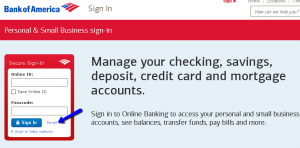
Step 1: Navigate to the Sign-in page and click on the ‘Enroll’ button as shown in the picture below.
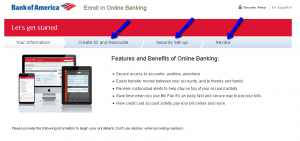
Step 2: Provide the needed information in the relevant spaces including complete card number or account number (you can use any one of your accounts, credit card or ATM/debit card number) and your Social Security number (SSN) or Tax Identification number (TIN). Click on ‘Continue.’

Step 3: You’ll be asked to create your unique Online ID and your Passcode for future accessing your online banking. Create them and click “Continue” again. Provide your security set-ups by filling all the appropriate fields.
The last step towards the confirmation of your new online account is to review the data you already provided.
FAQs
Q: What does the Better Balance Rewards stand for?
The Better Balance Rewards stands for the reward that is given to the holders of the BankAmericard Better Balance Rewards Credit Card who pay their balance faster and pay more than the monthly minimum. So, if you manage to pay your balance off on time, and even faster, you get the rewards $25 per quarter and up to $100 each year.
Q: What is a name suffix?
Once you fill in the online application from for BankAmericard Better Balance Rewards credit card, you will be asked to fill in a suffix, which is not obligatory but optional. Name suffix follows a person's full name and provides additional information about the person. People can use name suffixes as they want and they usually indicate that there are two people of the same name and surname, so the suffix differentiates them, or it can indicate the individual’s position, educational degree, office, or honor
Q: What are Quarterly Cash Rewards?
The BankAmericard Better Balance Rewards credit card offers its owners the ability to earn quarterly awards for every calendar quarter. However, the condition for achieving these awards is that all monthly payments are Qualifying Payments with Due Dates that fall within that quarter. The reward is $25 plus you can get a $5 Customer Bonus if you also have a Qualifying Customer Account. Since there are four quarters within a year, that means that you can earn up to $120 a year.
Permium Credit Card Offers
Compare BankAmericard Better Balance Rewards Credit Card
Recently Compared With (by users)
 Ashley Stewart Credit Card
 Bank of Hawaii Visa Credit Card
 Macy’s Credit Card
 Affinity Credit Union No Fee Choice Rewards MasterCard
 First Progress Platinum Select Mastercard Secured Credit Card
 Arvest Classic Visa Credit Card
 Starwood Preferred Amex Credit Card
 Huntington Credit Card
See All Comparisons >>
Huntington Credit Card
See All Comparisons >>


