


BankAmericard Secured Credit Card Login | Make a Payment
 Card Info
 Application
Card Rating
Share Your Opinion
Review this card now and let others know your thoughts.
Click here to leave a reviewThe BankAmericard Secured Credit Card gives you the chance to establish, strengthen or rebuild your credit. It also provides a facile online system where you can manage your account and make payments. Here, we’ll teach you how to log in, retrieve your user ID and passcode and set up a new account.
How to Login / Make a Payment
If you already have an online account, below you’ll find details on how to sign in:
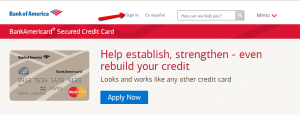
Step 1: On the upper side of the card’s homepage click on ‘Sign In.’
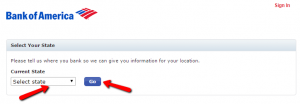
Step 2: Select the state you are a resident of from the menu and click on ‘Go’ to navigate to the sign-in page.
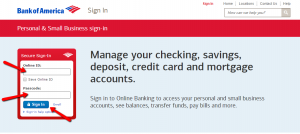
Step 3: Introduce your Online ID and Passcode and press ‘Sign In.’
Forgot Password / Username
Should you ever forget your Online ID, passcode or both, the card’s online system offers you an easy way to retrieve them.
Step 1: Open the card’s login page and press ‘Sign-in help options.’ A menu will appear from which you can select whether you forgot your ID, passcode or both.
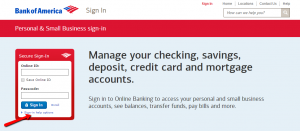
Step 2: Select which of your credentials you forgot.

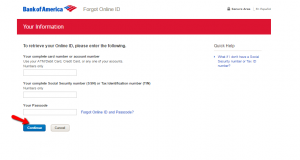
Step 3 (Online ID): If you forgot your Online ID, enter your complete credit card or account number, your complete Social Security Number or Tax Identification Number, your passcode and press ‘Continue.’
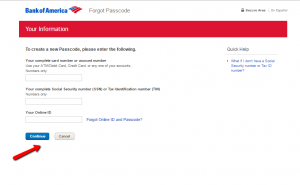
Step 3 (Passcode): If you forgot your passcode, introduce your complete card number or account number, your Social Security Number or Tax Identification Number, your Online ID and click ‘Continue.’
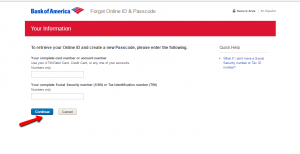
Step 3 (Online ID and Passcode): In case you forgot both of your credentials, provide your complete card number or account number, your Social Security Number or Tax Identification Number and click on the ‘Continue’ button.
Activation / Registration
Here is how you must proceed if you have a BankAmericard Secured Credit Card but did not yet associated it with an online account:
Step 1: Click on the ‘Enroll’ button in the card’s login page.
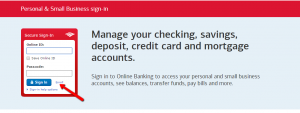
Step 2: Introduce your complete card number or account number, your complete Social Security Number or Tax Identification Number and press ‘Continue.’
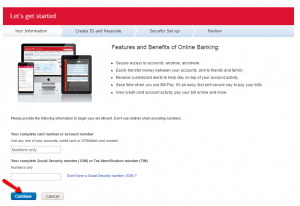
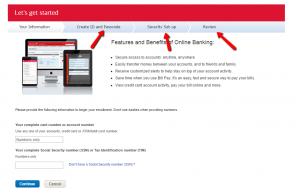
Step 3: You will be asked to create an Online ID and a passcode, to enter some security information and, after reviewing all the data you provided, you’ll be able to access your new online account.
FAQs
Q: What is an initial security deposit?
Each secured card demands certain amount of money to be put on the account at the moment of opening, so as to protect the issuer from possible misuse of the card, and to make sure that the cardholder would not be able to spend more than the amount of the deposit allows. The initial security deposit is the minimum refundable amount of money put on BankAmericard Secured account. The minimum is $300 and the maximum is $4,900. This is obligatory in order to be allowed to open this account.
Q: Is there a difference between a checking and saving account?
Yes, the difference exists even though both of them represent an agreement to give money to a bank, which will remain safe there until you decide to spend it. However, a checking account is usually used for everyday transactions, such as purchases, while a savings account is not for daily use. On your saving account, you put certain deposit which will remain there for the agreed period of time and will earn you interest.
Q: What is Paperless Statement Option?
Nowadays, banks and other card issuers are trying to convince people in using paperless statement options which offers higher account security and reduces paper consumption that the paper one. Paperless billing statements mean that you will not get a credit card statement in the mail anymore, but it will be available online and you can download, save, and print it any time you want. Of course, if you happen not to be satisfied with the paperless statement option you can always go back to paper statements.
Permium Credit Card Offers
Compare BankAmericard Secured Credit Card
Recently Compared With (by users)
 American Express Blue Card
 Westpac Altitude Black Credit Card
 JetBlue Credit Card
 Continental Finance Surge Credit Card
 Old Navy Visa Credit Card
 Chase Slate Credit Card
 Dodge Mastercard Credit Card
 76 Personal Credit Card
See All Comparisons >>
76 Personal Credit Card
See All Comparisons >>


