


Bank of America® Travel Rewards Visa® Credit Card Login | Make a Payment
 Card Info
 Application
Card Rating
Share Your Opinion
Review this card now and let others know your thoughts.
Click here to leave a reviewThe Bank of America® Travel Rewards Visa® Credit Card has an easy online system where you can log in to your account and pay your outstanding balance. Do not worry if you have forgotten your login details. Just follow the steps below to either retrieve your username and/or password or set up and activate a new account online.
How to Login / Make a Payment
Go to the following website to login and pay for your BankAmericard Travel Rewards Credit Card balance.
Step 1:
On this website, click on the red words at the very top right-hand side of the page that read ‘Sign In’.
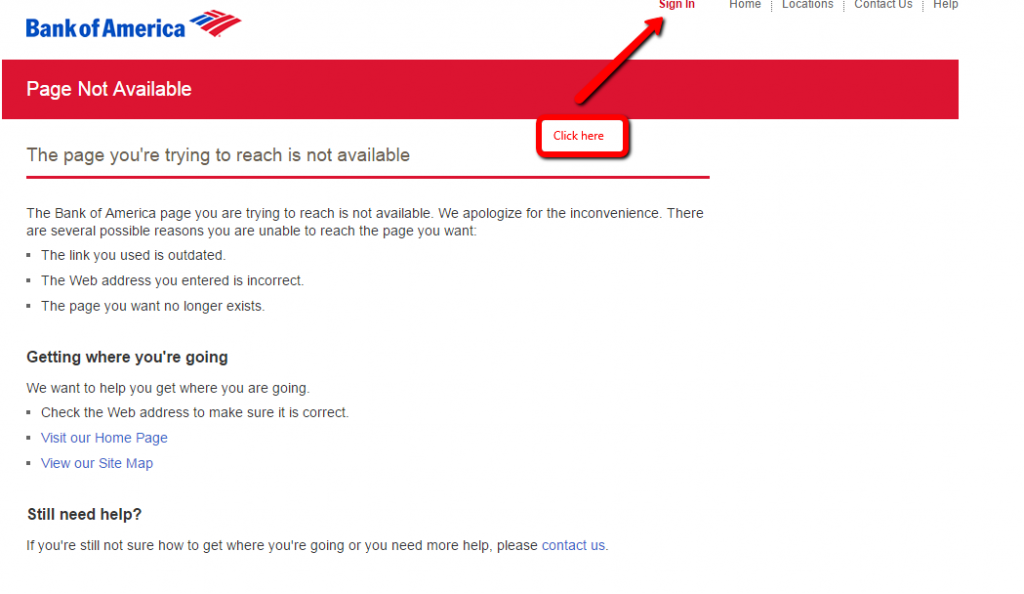
Step 2:
You will be taken to the page below.
Enter in your user ID and passcode in the red block on the left of the page, and then click on the blue button at the bottom of this section that reads ‘Sign In’.

Step 3:
Once you are signed in, you will be able to pay your account online.
If you are a first time user and not signed up for Bill Pay.
Select the Bill Pay tab and accept the Terms and Conditions.
After being enrolled, each time you want to pay your account, you can select the Bill Pay tab and pay your accounts.
Forgot Password / Username
Go to the following website in order to log in and there you can pay for your BankAmericard Travel Rewards Credit Card balance.
Step 1:
On this website, click on the red words at the very top right-hand side of the page that read ‘Sign In’ to be taken to the next page.
Step 2:
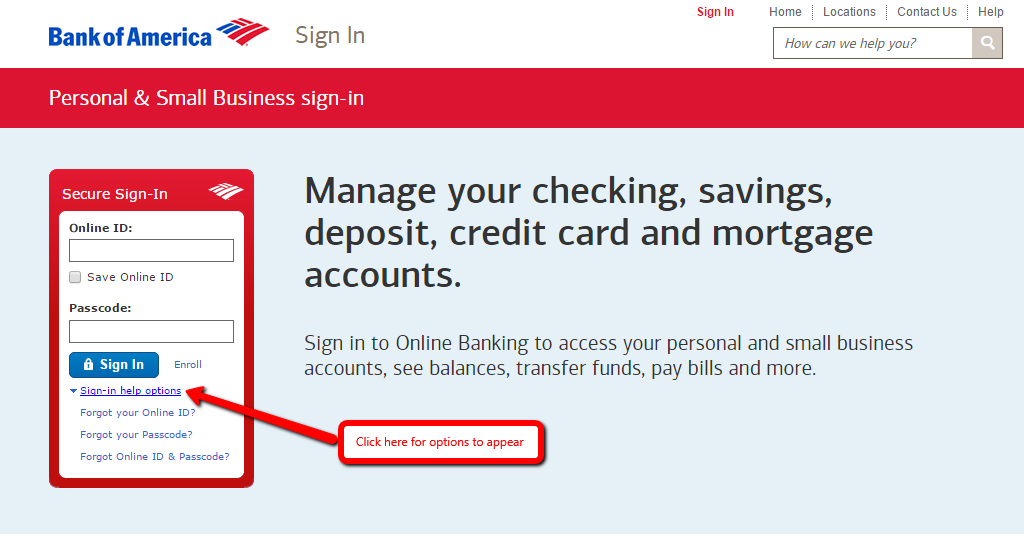
You will be taken to the page below.
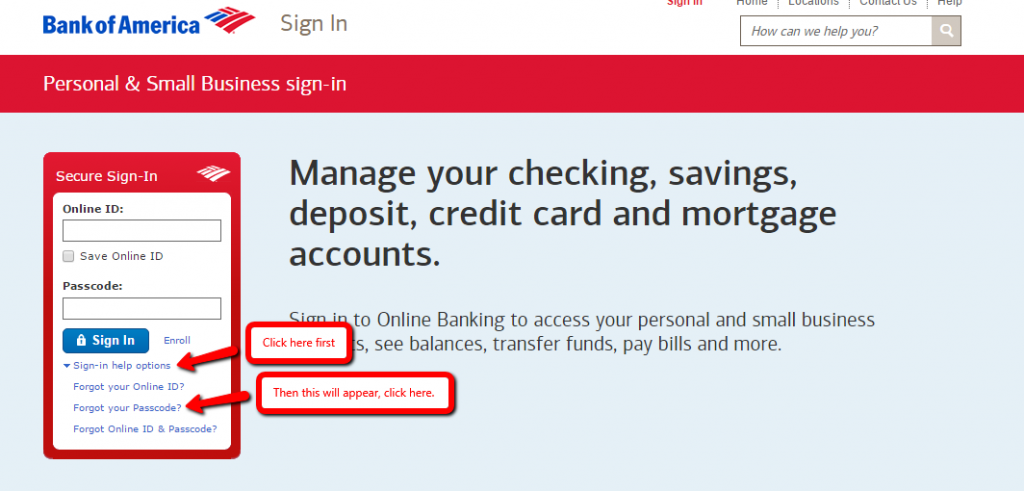
Near the bottom of the red box section that is headed ‘Secure Sign-In’, click on the words ‘Sign-in help options’ where a series of options will appear.
Step 3:
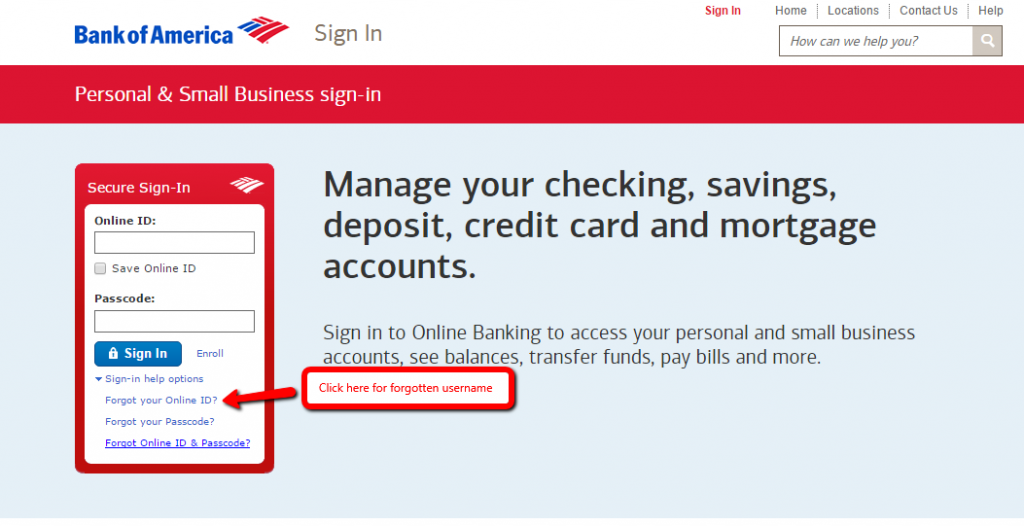
Out of these options, click on the words that say ‘Forgot your online ID’ if you have forgotten your username.
Step 4:
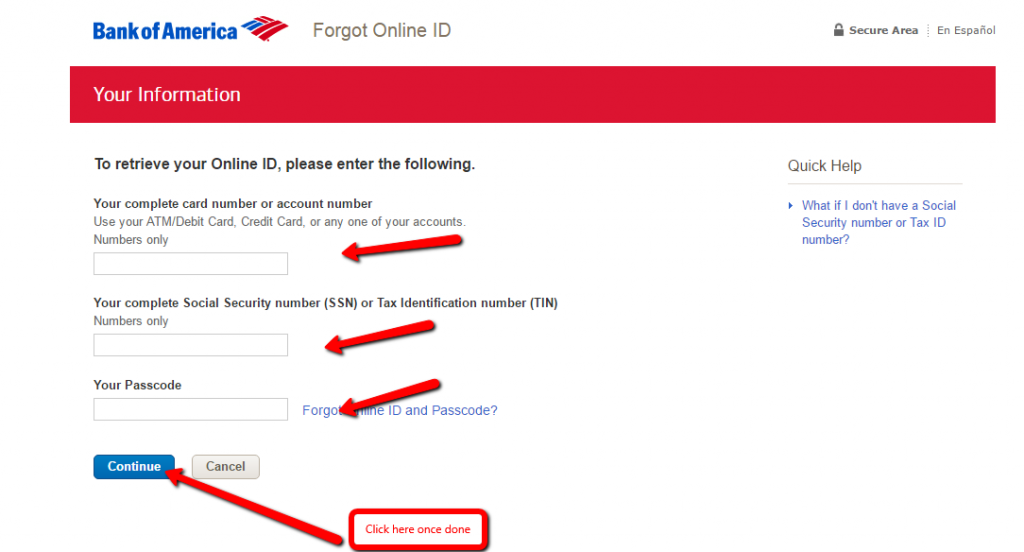
You will be taken to the page below.
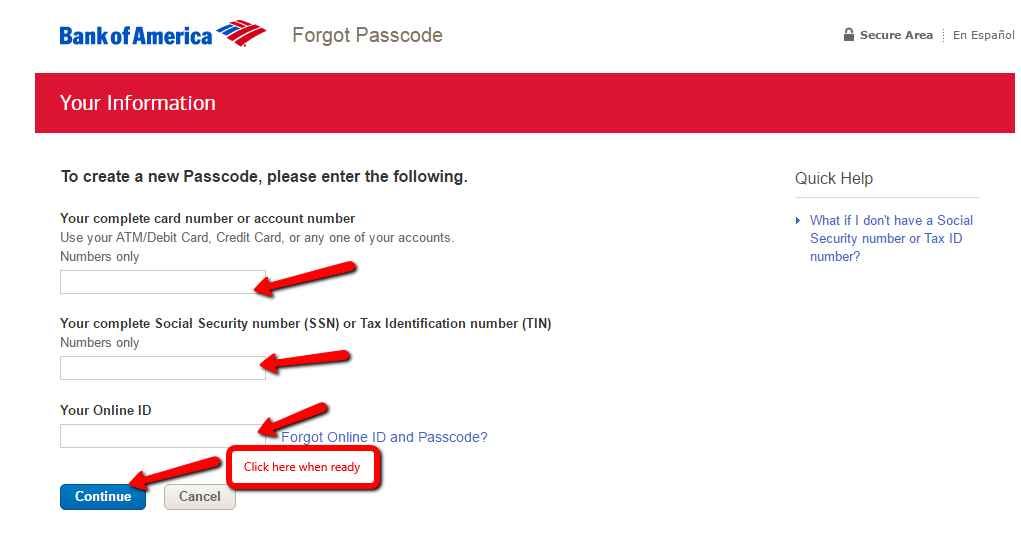
Enter in all details in the blocks provided and then click the blue button that reads ‘Continue’.
Step 5:
If you have forgotten your password, go to the following page and click on the words that say ‘Forgot your passcode’ which is in the drop-down list after clicking ‘sign-in help options’.
Step 6:
To recover your passcode, enter all required details in the blocks provided and then click the blue button that reads ‘Continue’.
Activation / Registration
Step 1:
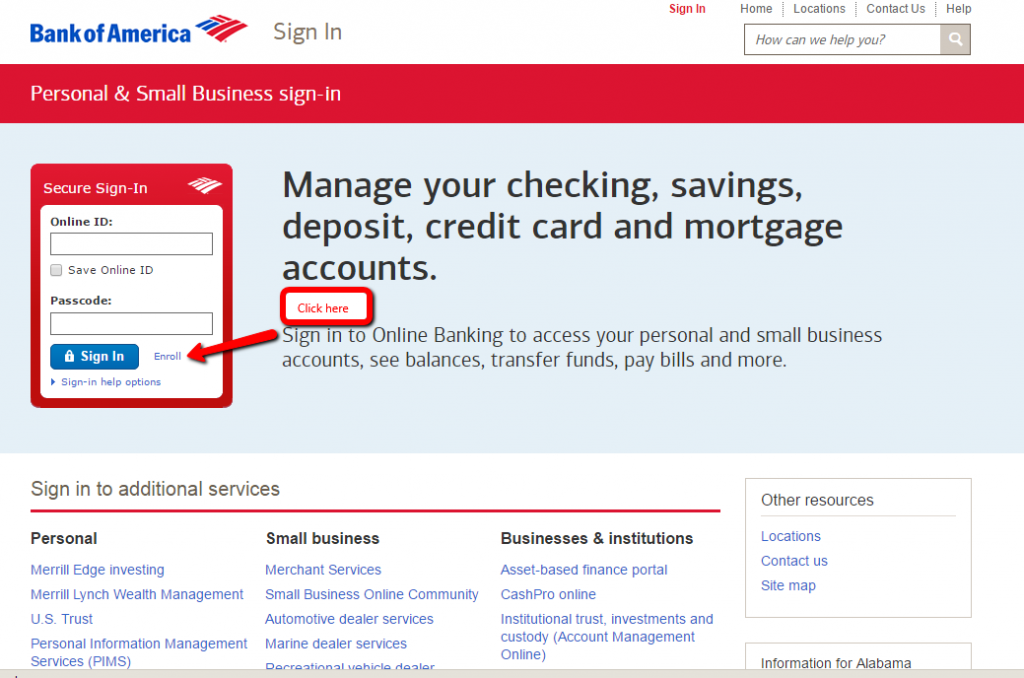
On this website, click on the blue highlighted words that read ‘Enroll’ that is at the bottom right-hand side of the block that is headed by ‘Secure Sign-In’.
Step 2:
You will be taken to the page below.
Fill in your details in the spaces provided.
Then click ‘Continue’ in the blue box at the bottom of the page.
Continue this process for the four sections and then your account will be set up.
FAQs
Q: What is the Bill Pay?
Once you get your BankAmericard Travel Rewards credit card you need to sign up for Bill Pay so as to be able to pay your account online. All you need to do is to click on the Bill Pay tab in Online banking website and accept the Terms and Conditions. It is necessary to enroll just for the first time, and later you can pay your bills each time by simple selecting the Bill Pay.
Q: What are the benefits of BankAmericard Travel Rewards?
Besides the great Signup Bonus after the opening of your account with Bank of America which includes $100 bonus cash rewards if you use your new credit card and spend $500 or more during the first three months, bonus cash rewards on the first $2,500 spent and 0% APR for the first 12 cycles, there are also numerous rewards such as 1% cash back for every $1 charged to your card, 2% cash back for every $1 spent at eligible grocery store and 3% cash back for every $1 paid via BankAmericard Travel Rewards credit card at eligible gas and fuel merchants. Once your cash rewards reach $25, you can redeem your cash rewards for a statement credit to pay for flights, hotels, rental cars or baggage fees. Also, you can earn unlimited 1.5 points for every $1 spent on all purchases. There is no annual fee and no foreign transaction fees.
Permium Credit Card Offers
Compare Bank of America® Travel Rewards Visa® Credit Card
Recently Compared With (by users)
 Chevron Premium Credit Card
 Apple Rewards Credit Card
 Ann Taylor Credit Card
 Chase Freedom Credit Card
 Huntington Credit Card
 Bass Pro Shops Outdoor Rewards Credit Card
 Gordmans Credit Card
 Barclaycard Rewards Mastercard
See All Comparisons >>
Barclaycard Rewards Mastercard
See All Comparisons >>


