


BB&T Spectrum Rewards Credit Card Login | Make a Payment
 Card Info
 Application
Card Rating
Share Your Opinion
Review this card now and let others know your thoughts.
Click here to leave a reviewThe BB&T Spectrum Rewards Credit Card offers not only fantastic cash back rewards and generous signup bonuses, but also a facile online system where you can easily manage your account. Here, we will guide you through the process of logging in, retrieving your credentials and opening an online account.
How to Login / Make a Payment
In you already created an online account with BB&T, here are the steps you need to follow in order to log in:
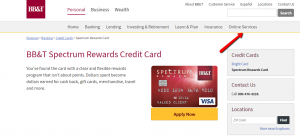
Step 1: Go to the credit card’s homepage and click on ‘Online Services.’
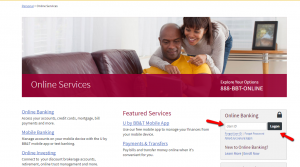
Step 2: Introduce your User ID and press ‘Logon.’ You will then be asked to provide also your password.
Forgot Password / Username
If you forgot your User ID or password, here is how to proceed in order to retrieve them:
Step 1: Open the credit card’s login page and click either on ‘Forgot User ID’ or ‘Forgot Password.’
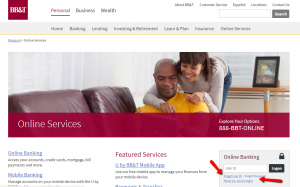
Step 2 (User ID): If you forgot your User ID you need to call the phone number provided in order to retrieve it.
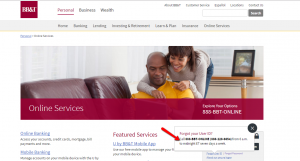
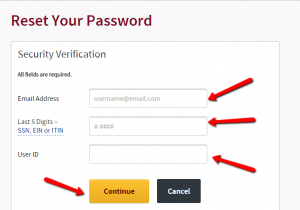
Step 2 (Password): If you forgot your password, introduce your email address, the last 5 digits of your SSN, EIN or ITIN, your User ID and press ‘Continue.’
Activation / Registration
If you don’t have an online account yet, here are the steps you should follow to set one up:
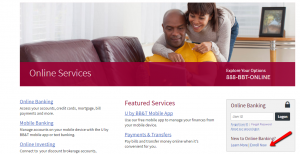
Step 1: Navigate to the credit card’s login page and click on the ‘Enroll Now’ button.
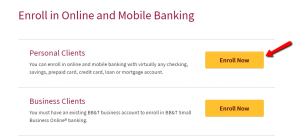
Step 2: Press the ‘Enroll Now’ button associated to the ‘Personal Clients’ option in order to open the online registration form.
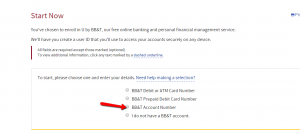
Step 3: Select ‘BB&T Account Number.’
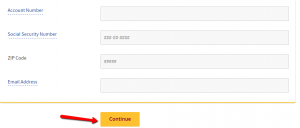
Step 4: Introduce in the appropriate fields your account number, your social security number, your Zip Code and your email address and press ‘Continue.’ On the following page, you will be asked to select a User ID and a Password and your registration will be complete.
FAQs
Q: What is a pre-tax annual income?
The pre-tax annual income is the person’s total income before he/she pays any kind of tax, but after he/she takes deductions. It represents the total amount of income earned during one year from all sources.
Q: What is U by BB&T?
U by BB&T is online and mobile banking experience issued by BB&T Bank in order to allow its clients to monitor their BB&T accounts, pay bills, set and manage receipts and much more, from your smartphone or tablet. This is a secure mobile application designed for iPhone, iPad and Android devices and can be found on GooglePlay and AppStore and it is free of charge.
Q: Who are BB&T participating retailers?
BB&T has its participating retailers and some of them are AT&T, Chili’s, DirectTV, Jamba Juice, PetSmart, Sears, Sephora and Starbucks. The BB&T Deals program does not allow the retailers to get access to your account or personal information.
Q: What is Mobile Text?
Mobile text is the option given to the owners of BB&T accounts which allows them to just send a text message to 69228 and insert the text command according o what do you want to be informed about. Within a few seconds, you will be texted back with the information you requested. Some of the text commands are: BAL for balance, TRA for transfers, LAST for transaction history, INFO for a list of all the quick codes, HELP for quick code help etc.
Permium Credit Card Offers
Compare BB&T Spectrum Rewards Credit Card
Recently Compared With (by users)
 Lowe’s Consumer Credit Card
 Ann Taylor Credit Card
 Frontier Airlines Credit Card
 Virgin Atlantic MasterCard Credit Card
 Buckle Credit Card
 Hawaiian Airlines Bank of Hawaii World Elite Mastercard
 Farm Sanctuary Credit Card
 Upromise Mastercard Credit Card
See All Comparisons >>
Upromise Mastercard Credit Card
See All Comparisons >>


