


BBVA Compass Select Credit Card Login | Make a Payment
 Card Info
 Application
Card Rating
Share Your Opinion
Review this card now and let others know your thoughts.
Click here to leave a reviewThe BBVA Compass Select Credit Card offers you not only an amazing point rewards system and fabulous signup bonuses but also the possibility to easily manage your account online. Scroll down for information on how to log in, how to reset your password and how to set up a new online account.
How to Login / Make a Payment
In case you have already set up an online account, there is nothing easier than signing in and managing your account. Here is what you need to do:
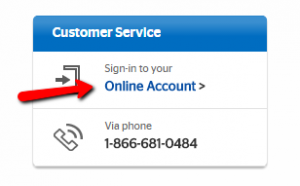
Step 1: Open the credit card’s homepage and click on the ‘Sign-into your Online Account’ button in order to open the log in page.
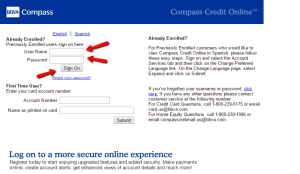
Step 2: Introduce in the appropriate fields your user name and password and press the ‘Sign On’ button in order to access the online account associated to your credit card.
Forgot Password / Username
In case you forgot your password, it is extremely easy to reset it online. Here are the steps you should follow:
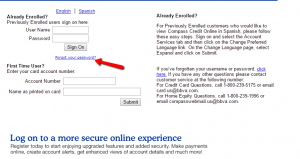
Step 1: Go to the credit card’s log in page and click on the ‘Forgot your password?’ button in order to open the password retrieval/reset webpage.
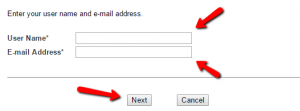
Step 2: Enter in the required fields your user name and your email address and press ‘Next.’ On the following page you will be asked to provide a new password.
Activation / Registration
If you got a BBVA Compass Select Credit Card you should immediately enroll in the online banking system in order to easily manage your account and make payments from your PC, tablet or phone. The registration procedure is extremely simple and straightforward. Here is what you have to do in order to complete it:
Step 1: Open the credit card’s log in page and, under the ‘First Time User’ option enter your account number as well as your name as printed on the card. Then click on the ‘Submit’ button and your registration is almost complete. You will just need to select a username and password to finalize it.

FAQs
Q: What does BBVA stand for?
BBVA stands for Banco Bilbao Vizcaya Argentaria, the First Bank of Spain.
Q: What is BBVA Compass?
The BBVA Compass is the subsidiary of the Spanish multinational Banco Bilbao Vizcaya Argentaria since 2007, but it operates as a United States-based company, located in Birmingham, Alabama and operating in Alabama, Arizona, California, Colorado, Florida, New Mexico, and Texas. The BBVA Compass has 688 branch locations and it is the 31st largest bank in the United States. Its 50 years long tradition thought BBVA Compass to understand that every individual and company has unique ambitions, needs and wants so they create opportunities for everyone.
Q: Is it true that I can choose the category in which I will earn the most points?
Yes, the owners of BBVA Compass Select Credit Card can decide one category they want to select so as to earn 3 x points and 2 categories to earn 2 x points depending on the amount of money they spend on certain purchases. 1 x point per $1 spent can be earned on all other purchases. However, that is not all. They can get up to 1,000 additional bonus points monthly if they spend $5,000 or more in qualifying purchases.
Q: Do I need to have an excellent credit score so as to apply for BBVA Compass Select Credit card?
You need to have at least a good credit standing in order to apply, since that is one of the conditions which need to be fulfilled.
Permium Credit Card Offers
Compare BBVA Compass Select Credit Card
Recently Compared With (by users)
 BP Visa Credit Card
 David’s Bridal Credit Card
 Union Plus Credit Card Cash Rewards
 Chase Sapphire Preferred Card
 Gander Mountain Credit Card
 Farm Sanctuary Credit Card
 PNC CashBuilder Visa Credit Card
 Air Force Federal Credit Union Credit Card
See All Comparisons >>
Air Force Federal Credit Union Credit Card
See All Comparisons >>


