


Journey® Student Credit Card from Capital One® Login | Make a Payment
 Card Info
 Application
Card Rating
Share Your Opinion
Review this card now and let others know your thoughts.
Click here to leave a reviewThe Capital One Journey Student Rewards Credit card offers you not only generous cash back rewards and the possibility to closely monitor your credit score, but also a user-friendly internet platform where you can manage your account. Here, we will show you how to log in, retrieve your forgotten credentials and set up an online account.
How to Login / Make a Payment
In case you already have an online account associated to your card, here is a very simple way of accessing it:
Step 1: Open the credit card’s homepage and click on the ‘Sign In’ button.

Step 2: Press ‘Sign In’ under the US Credit Cards option in order to open the card’s log in page.
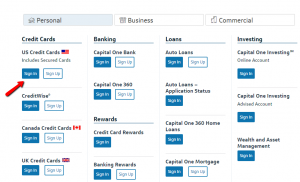
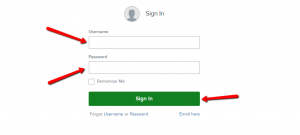
Step 3: Introduce in the appropriate fields your username and password and click ‘Sign In.’
Forgot Password / Username
In case you forgot your username and/or password, there is a very simple procedure to retrieve them. Here are the steps you should follow:
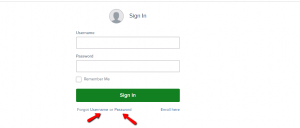
Step 1: Go to the credit card’s log in page and click on ‘Forgot Username’ or ‘Forgot Password’ to open the appropriate credentials retrieval page.
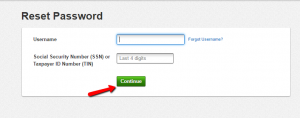
Step 2 (username): If you forgot your username, introduce your account number and the last 4 digits of your social security number and press ‘Continue’ in order to retrieve it.

Step 2 (password): If you forgot your password, introduce your username and the last 4 digits of your social security number and press ‘Continue’ in order to reset your password.
Activation / Registration
If you don’t have yet an online account associated to your credit card, here are the steps you have to follow in order to create one.
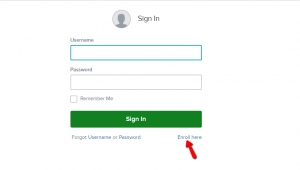
Step 1: Navigate to the credit card’s log in page and click on the ‘Enroll here’ button to open the registration form.
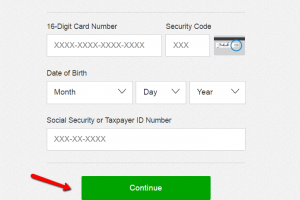
Step 2: Introduce your 16-digit card number, the security code on the back of your card, your date of birth, your social security or taxpayer ID number and click on ‘Continue.’
FAQs
Q: What is the necessary information to have at hand when enrolling to online bank account platform?
The enrolling onto online banking is a simple process and the obligatory information that you need to provide are your 16-digit card number, the security code on the back of your card, your date of birth, your social security or taxpayer ID number. So, your credit card should be at hand.
Q: What is 401k account?
A 401(k) is a retirement savings account which is offered by an employer. What you do is to save some amount of money from your paychecks and invest it through this account. You do not pay any taxes until you withdraw the money from the account. 401(k) plans are named after the section of the tax code that governs them, and since the 1980s when they appeared, they are used as a supplement to pensions.
Q: I have noticed a mistake on my statement. Who should I refer to?
There is a possibility of error on your statement and it certainly should be reported. You can send a letter to Capital One, P. O. Box 30279, Salt Lake City, UT 84130-0279 which will contain the account information such as your name and account number, the dollar amount of the suspected error, the description of what you believe is mistaken. This must be reported during the first 60 days from the issuing of the statement and 3 business days before an automated payment is scheduled. In case you do not report potential errors in writing, the issuer is not required to investigate any potential errors.
Permium Credit Card Offers
Compare Journey® Student Credit Card from Capital One®
Recently Compared With (by users)
 ASU Platinum Credit Card
 BrandsMart USA Credit Card
 Dressbarn Credit Card
 Wells Fargo Home Rebate Visa Signature Card
 Nordstrom Credit Card
 Peebles Credit Card
 Chase Amazon Credit Card
 Ohio Savings Bank Platinum Visa Credit Card
See All Comparisons >>
Ohio Savings Bank Platinum Visa Credit Card
See All Comparisons >>


