


Capital One® VentureOne® Rewards Credit Card Login | Make a Payment
 Card Info
 Application
Card Rating
Share Your Opinion
Review this card now and let others know your thoughts.
Click here to leave a reviewThe Capital One® VentureOne® Rewards Credit Card is a great option for enjoying shopping and accumulating miles redeemable on travel tickets and more. If you are having problems managing your account and keep track of all the features this card provides, here we’ll show you how to log in, retrieve your credentials and activate/register your card online.
How to Login / Make a Payment
If you have an online account, follow our guide on how to log-in in a few simple steps:
Step 1: Visit the Capital One VentureOne Credit Card’s homepage and press the ‘Sign in’ button on the top-right corner.

Step 2: A new page with different online account access options will open.
Here, click the ‘Sign in’ button under the Personal US Credit Cards option as shown in the picture below.
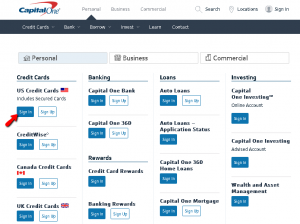
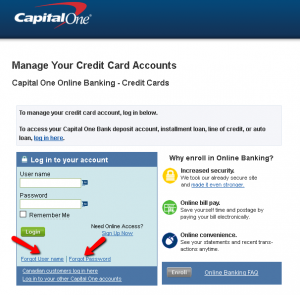
Step 3: Introduce your username and password in the available spaces and click the ‘Login’ button.

Forgot Password / Username
If you forgot your username or password, you can retrieve each of them by following these steps:
Step 1: On the login page press on one of these options: “Forgot User name” or “Forgot Password”.
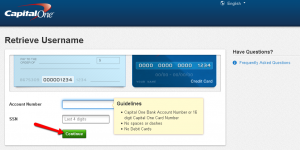
Step 2 (username): Introduce your account number and the last four digits of your Social Security Number. Click on the ‘Continue’ button to proceed to retrieve your username.
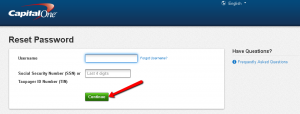
Step 3 (password): Provide your username and the last four digits or your Social Security Number or your Taxpayer ID Number, and press ‘Continue’. Now you can reset your password by following the provided indications.
Activation / Registration
Step 1: After navigating to the login page, you can click on the ‘Sign Up Now’ button for creating an online account.

Step 2: On the next page, introduce the card number (16-digits) for which you’d like to activate the online account as well as the card’s security code.
Provide your date of birth and Social Security Number or Taxpayer ID Number and click ‘Continue.’

FAQs
Q: How can I earn 20,000 miles with my Capital One VentureOne Credit Card?
The sign up bonus for Capital One VentureOne Credit Card is 20000 miles, which is equal to $200 in travel, can be earned by spending $1,000 on purchases paid by Capital One VentureOne Credit Card during the first 3 months after opening the account.
Q: What will happen if I forgot my username?
You do not need to worry in case you forgot your username or any other credentials. There is always a way of retrieving it. All you need to do is to visit the official website and go to online banking sign in field. Then, you should click on “Forgot your username” button where you will be asked to enter your account number and the last four digits of your Social Security Number. Once you enter them, click on the ‘Continue’ button and your username will be retrieved.
Q: How are Hotels.com and Capital One linked?
Hotels.com and Capital One joined together in order to bring their clients astonishing rewards if they stay in hotels! Only Capital One Venture® and VentureOne® cardholders with good account standing are allowed to earn unlimited 10 x miles at hotels.com/venture up to January 31, 2020. No other cards, neither Capital One are eligible to participate. What you need to do is to visit hotels.com/venture and pay with your Capital VentureOne card. The only condition is that you must pay at the time of booking so as to be allowed to earn 10 x miles.
Permium Credit Card Offers
Compare Capital One® VentureOne® Rewards Credit Card
Recently Compared With (by users)
 State Farm Rewards Visa Credit Card
 Zions AmaZing Rewards Business Credit Card
 Amex Blue Cash Preferred Credit Card
 Fifth Third Real Life Rewards Credit Card
 Wells Fargo Cash Back College Visa Card
 Toys R Us Credit Card
 Affinity Credit Union Low Fee Gold Choice Rewards MasterCard
 Zions AmaZing Rate Business Credit Card
See All Comparisons >>
Zions AmaZing Rate Business Credit Card
See All Comparisons >>


