


Chase Amazon Credit Card Login | Make a Payment
 Card Info
 Application
Card Rating
Share Your Opinion
Review this card now and let others know your thoughts.
Click here to leave a reviewChase Amazon Credit Card offers its holders an amazing signup bonus, a great cash back rewards system as well as a user-friendly online system where they can manage their accounts, pay their bills and purchase things. On this page, we will show you how to log in, how to retrieve your credentials and how to create an account.
How to Login / Make a Payment
If you already have an online account, here is how you can log in to manage it and make payments:
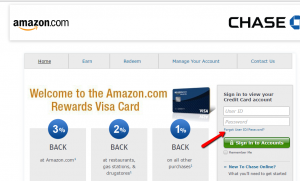
Step 1: Go the card’s sign in page, introduce your User ID and Password in the appropriate fields and click on the ‘Sign into Accounts’ button.

Forgot Password / Username
In case you forgot your User ID or password, here is a very easy procedure for retrieving them:
Step 1: Open the card’s sign in page and click on the ‘Forgot Your User ID/Password?’ button. This will lead you to a page where you can recover your credentials.
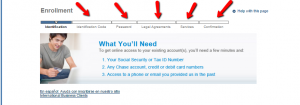
Step 2: Introduce your Social Security Number (or Tax ID Number), y

Step 3: After introducing this data your user ID will be retrieved and you will be given an identification code which you can use to reset your password.

Activation / Registration
In case you don’t have an online account associated with your Chase Amazon Credit Card, here is how you can create one:
Step 1: On the card’s sign in page click on the ‘New to Chase Online?’ button in order to open a window where you can activate your online account.

Step 2: Enter your Chase account, credit or debit card’s number and your social security number, choose a User ID and click ‘Next.’

Step 3: Once you introduced this information, you will get an identification number, you will be able to select a password and, after carefully reviewing the legal agreements and services, you can confirm your desire to open this account.
FAQs
Q: I do not have an Amazon account. How can I get it?
Amazon is an online shopping website, whose products are books, electronics, furniture, and clothing. If you want to buy items on amazon.com website, you need to set up an account. The account set up takes a few minutes. You should go to amazon.com, enter your personal information, such as your name and email address, choose a password and when all the necessary information are provided, you just click on “Create Account” button. Opening of the basic Amazon account is totally free, but if you want the Prime account, then there is a fee.
Q: What is the difference between Amazon Rewards Visa Signature Card and Amazon Prime Rewards Visa Signature Card?
The main difference between Amazon Rewards Visa Signature Card and Amazon Prime Rewards Visa Signature Card are the benefits that the owners get. With both of the cards you can earn 3% back rewards on Amazon.com purchases, including digital download, Gift Cards, Amazon Prime subscriptions, and many others, 2% back at restaurants, gas stations, and drugstores and 1% back on all other purchases. However, the owners of Amazon Rewards Visa Signature Card get a $50 Amazon.com Gift Card upon approval, while the holders of Amazon Prime Rewards Visa Signature Card get a $70 Amazon.com Gift Card upon approval.
Permium Credit Card Offers
Compare Chase Amazon Credit Card
Recently Compared With (by users)
 AgFed Credit Union Platinum Visa Credit Card
 Capital One® Spark® Classic for Business Credit Card
 Bealls Outlet Credit Card
 The Platinum Card® from American Express
 Toys R Us Credit Card
 Dressbarn Credit Card
 Zions AmaZing Rewards Business Credit Card
 Capital One® VentureOne® Rewards Credit Card
See All Comparisons >>
Capital One® VentureOne® Rewards Credit Card
See All Comparisons >>


Got mail about account closure. I do not remember acct number, id or password. Account ending in 4875. Name is Quirino Escamilla, 16318 David Glen Dr., Friendswood, Texas 77546. Phone is 832-483-1295. Trying to ascertain if I should respond to this mail.