


J Crew Credit Card Login | Make a Payment
 Card Info
 Application
Card Rating
Share Your Opinion
Review this card now and let others know your thoughts.
Click here to leave a reviewRegister you J Crew Credit Card and manage your account online. You can check your account, pay your bills, change your account details –and many more! The how-to’s below will show you how.
How to Login / Make a Payment
Step 1: Access the JCREW credit card Website by clicking on the link. Once on the home page, key in your username and password in the fields located in the left side of the page

Step 2: Before proceeding to log in, make sure to unmark the box that says Remember Me to make sure that there will be no unauthorized access to your account, especially if you are using a public or shared computer. However, if you are accessing the website using your personal computer or device, it is okay to mark the box. Understand that in doing so, it is easier to access your account. Once you have marked or unmarked the box, click on Sign In.

Forgot Password / Username
Step 1: In case you forget your username or password, you may still access your account through logging in the website. In the home page, instead of entering your username and password, you have to look for the link that says Forgot your username and password? Click on that and proceed to the next page

Step 2: To complete the verification process, provide the needed information such as:
- Credit card account number or username
- Zip or postal code

- Identification type, it can either be your Social Security number, Social Insurance number, or an alternate identification. If you opt for your Social Security number or Social Insurance number, you will have to provide the last four digits of your chosen ID. If you choose an alternate identification, you will have to specify the type of alternate ID

Step 3:Click on find my account and proceed with the verification

Activation / Registration
Step 1: To register for online access , open the link and click on the Register for online access located in the top part of the page. Alternately, there is also a button on located at the right bottom part of the page that will both take you to the succeeding page
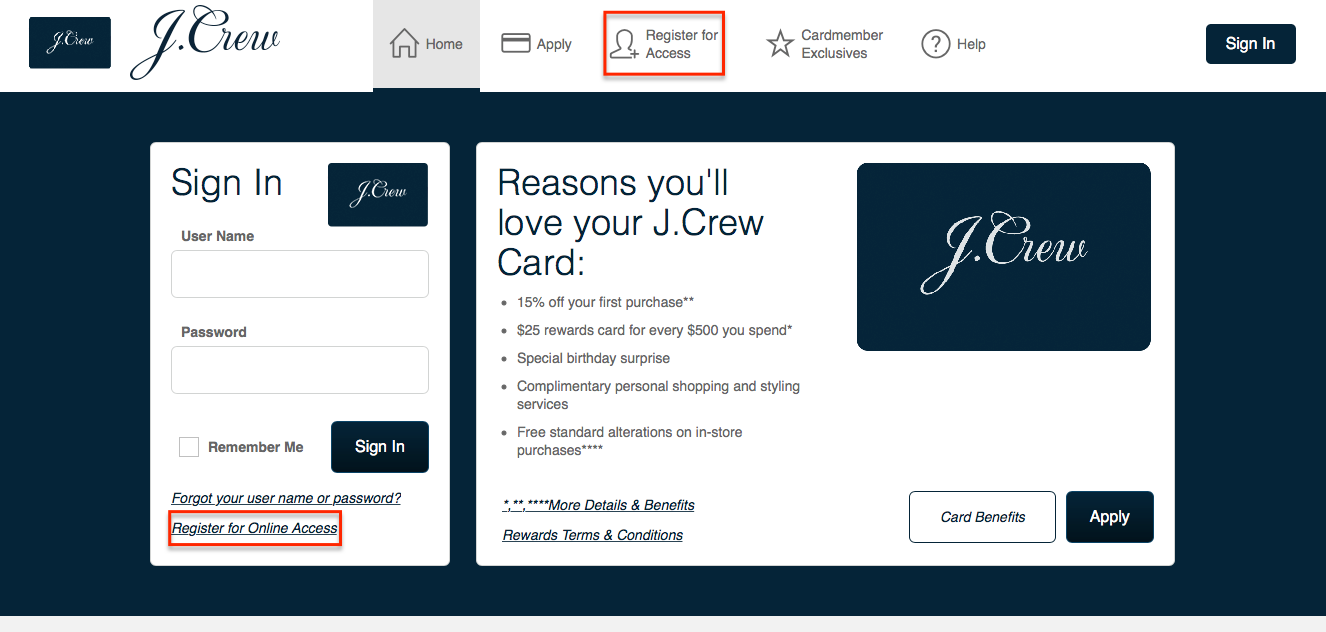
Step 2: You will need to first fill out the needed information which are:
- Credit card account number or username
- Zip or postal code
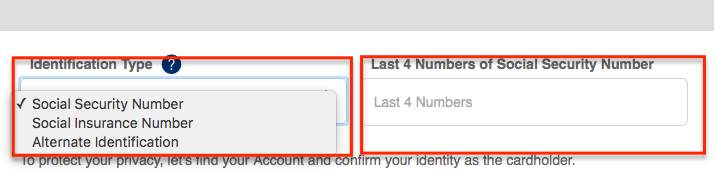
- Identification type, for Social Security number and Social Insurance number, you will have to provide the last four digits. For the alternate identification, you will need to specify the alternate ID provided

Step 3: Click on the Find My Account button and follow the prompts.

Step 4: The grayed out Create My Account grayed out box will be available once your account has been verified. Fill in the information needed, uncheck the Remember My Device button if you are using a public computer. Click on the Create Account button when you are done.

FAQs
Q: What is J Crew?
J.Crew Group, Inc. is an American multi-brand retailer, which sells women's, men's and children's clothes and accessories. The company’s business operates in factory, Madewell stores, through catalogs and online. Since its foundation in 1947 it has grown into one of the most successful retail shops in the U.S. Nowadays, the company operates 575 retail stores, including 281 J.Crew stores, 113 Madewell stores, and 181 J.Crew Factory outlet locations internationally in Canada, France, UK, China, and Korea. Also there are 76 locations in Japan, which are operated under license by ITOCHU Corporation.
Q: What does complimentary standard alterations on your in-store purchases stand for?
When you purchase some of the items in J Crew store using your J Crew Credit card, you will get the benefit of complimentary standard alterations which means that the clothes that need some tailoring will be changed in the store, without having to pay more than the price. These services are limited to pant and skirt hemming and sleeve alterations, but do not apply to leather, suede or beaded fabrics or on J.Crew Factory merchandise.
Q: How long do my Reward Points last?
Customers should know that the Reward Points expire 12 months after the date that they are posted to your Points balance. You might also lose points if you file for bankruptcy or your account is closed for any reason. So, make sure that you used all your rewards points before the expiration date.
Permium Credit Card Offers
Compare J Crew Credit Card
Recently Compared With (by users)
 Central Bank ONLY Card MasterCard
 Alliant Visa Platinum Rewards Credit Card
 Affinity Credit Union Low Fee Gold Choice Rewards MasterCard
 New York and Company Credit Card
 Citi Prestige Credit Card
 American Express Morgan Stanley Credit Card
 Bealls Outlet Credit Card
 Continental Finance Matrix Credit Card
See All Comparisons >>
Continental Finance Matrix Credit Card
See All Comparisons >>


