


L.L. Bean Credit Card Login | Make a Payment
 Card Info
 Application
Card Rating
Share Your Opinion
Review this card now and let others know your thoughts.
Click here to leave a reviewIf you get L.L. Bean Visa credit card, you will have a lot of different rewards and special offers. Also, you will have your personal online account, where you can take a look at your credit history or make a payment. Look at the instructions below to know how to login to L.L. Bean online account.
How to Login / Make a Payment
Step 1
Visit the official website of L.L. Bean credit card. you can use this link:
https://www.barclaycardus.com/servicing/
Step 2
You will appear at Barclaycard website. That’s fine, L.L. Bean is coworking with this service. At the right side of the page, you will see cardmember login window.
Fill your username and password in proper fields. After that, click “Log In” button and you will be redirected to your personal online account of L.L. Bean credit card.

Forgot Password / Username
If you forgot your username or password to L.L. Bean online account, follow the next steps.
Step 1
Visit the official website of L.L. Bean visa credit card. Follow link below:
https://www.barclaycardus.com/servicing/
Step 2
At the right side of the main page, you will see a “Forgot username or password” link. It’s located under the blue “Log In” button. Click on the link.

Step 3
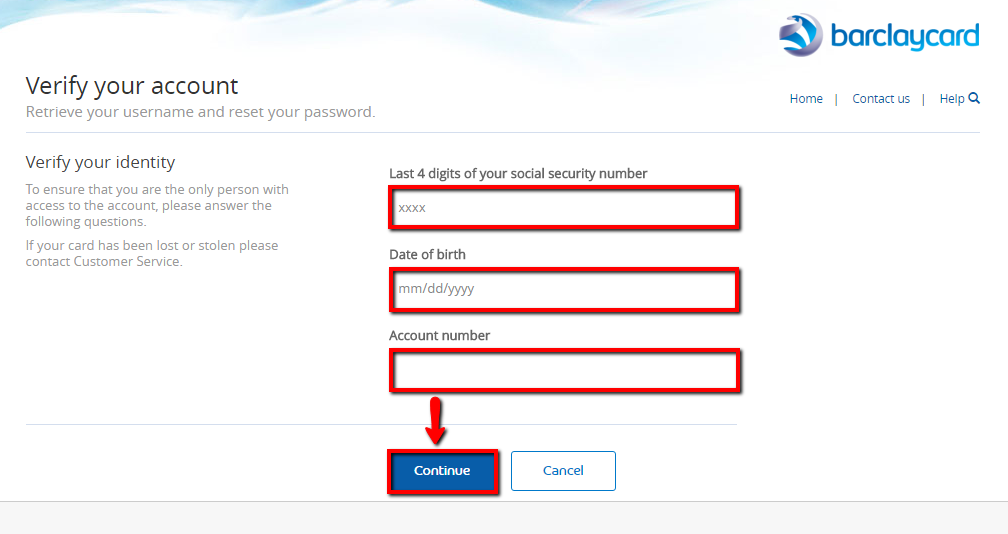
You will be redirected to the card service page. All you need is to verify your account. You will be needed to fill your SSN, date of birth and credit card number into the fields.
After that, click on the “Continue” button and you will be redirected to the page with your username. Also, the system will require a new password from you.
Activation / Registration
If you just get your L.L. Bean Visa credit card, you need to activate it. Look at the following instruction to know how to do it.
Step 1
Visit the official site of L.L. Bean credit card. Link is here:
https://www.barclaycardus.com/servicing/
Step 2
At the bottom of the right side, you will see a little window with a blue “Set Up Online Access” button. Click on it!

Step 3
You will be redirected to the registration page. At this page, you will be needed to fill personal information such as your Social Security Number, Date of Birth, and Credit Card number.
Also, you will be needed to create a username and a password for your online account. After that click on the “Continue” button and you will be redirected to your account.

FAQs
Q: What can Coupon Dollars be used for?
Coupon Dollars are earnings charged to the Card during each periodic billing cycle. The type of transaction that qualify for Coupon Dollars including fees, finance charges and other transaction charges are determined by the Program and the eligible purchases should be made by the Cardmember or any authorized user of the Card. Whenever a Cardmember earns ten Coupon Dollars, a ten dollar Coupon will automatically be issued with the statement. The time limit for the Coupons to be used is twelve months from the date of issue. They cannot be returned to The Program once they have been converted into a Coupon since they have no cash or monetary value.
Q: How does a joint applicant differ from an authorized user?
There is a big difference between these two. When two people jointly sign a loan and both of them have responsibilities for the debt that means that they made a joint account. They both apply and sign the loan and can equally use the credit card. On the other hand, the authorized user has no responsibility at all and everything that he/she spends goes to the account of the person who authorized them. You can easily remove the authorized user, but the joint applicant need to come to the bank or another credit card issuer and the procedure of removing him/her is a bit complicated.
Permium Credit Card Offers
Compare L.L. Bean Credit Card
Recently Compared With (by users)
 Continental Finance Matrix Credit Card
 Plenti American Express Credit Card
 Torrid Credit Card
 Amex Blue Cash Preferred Credit Card
 Affinity Credit Union Gold MasterCard
 Wells Fargo Secured Visa Credit Card
 CFCU Visa Classic Credit Card
 Bank of America® Cash Rewards Credit Card
See All Comparisons >>
Bank of America® Cash Rewards Credit Card
See All Comparisons >>


