


Petland Credit Card Login | Make a Payment
 Card Info
 Application
Card Rating
Share Your Opinion
Review this card now and let others know your thoughts.
Click here to leave a reviewIf you own a Petland Credit Card, you have an access to the online account. You can look at credit history or your coupons, or make a payment right in your personal online cabinet. Take a look at the instructions below, to know how to login into your Petland online account.
How to Login / Make a Payment
Step 1
Visit the official web page of Petland credit card. You can follow link below:
https://d.comenity.net/petland/
Step 2
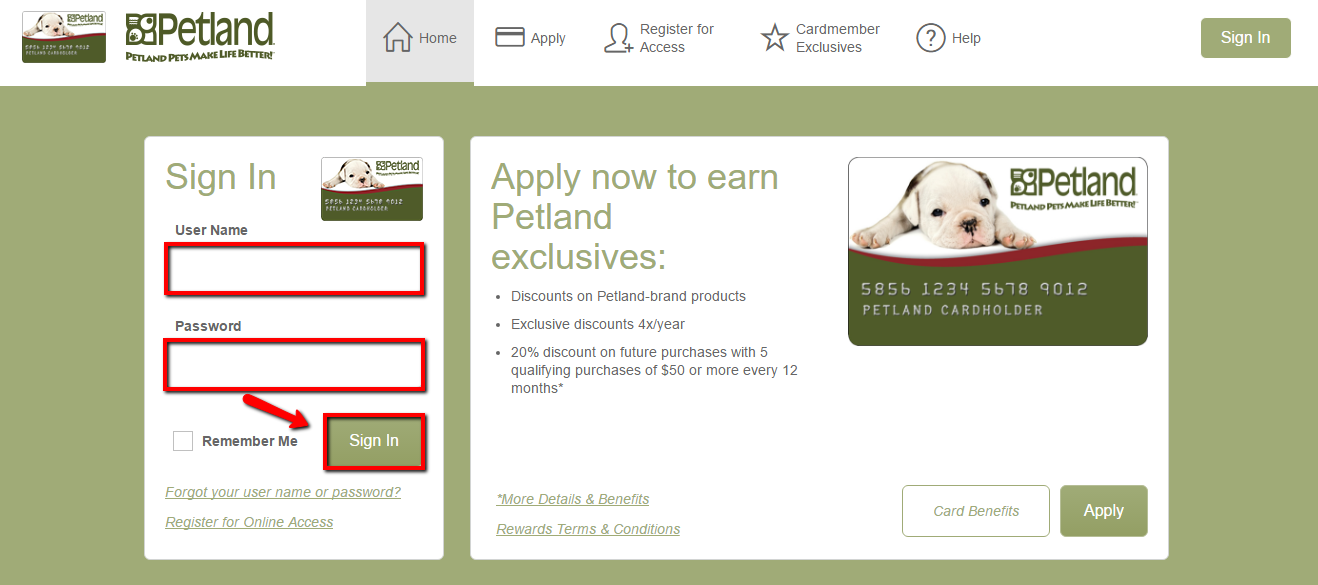
At the left side of the homepage, you will see login fields.
Fill your username and password there and click “Log In” button. After that, you will appear at your online cabinet.
Forgot Password / Username
If you forgot your Petland username or password, please follow the next steps.
Step 1
Visit the official website of Petland credit card. Use the link below:
https://d.comenity.net/petland/
Step 2
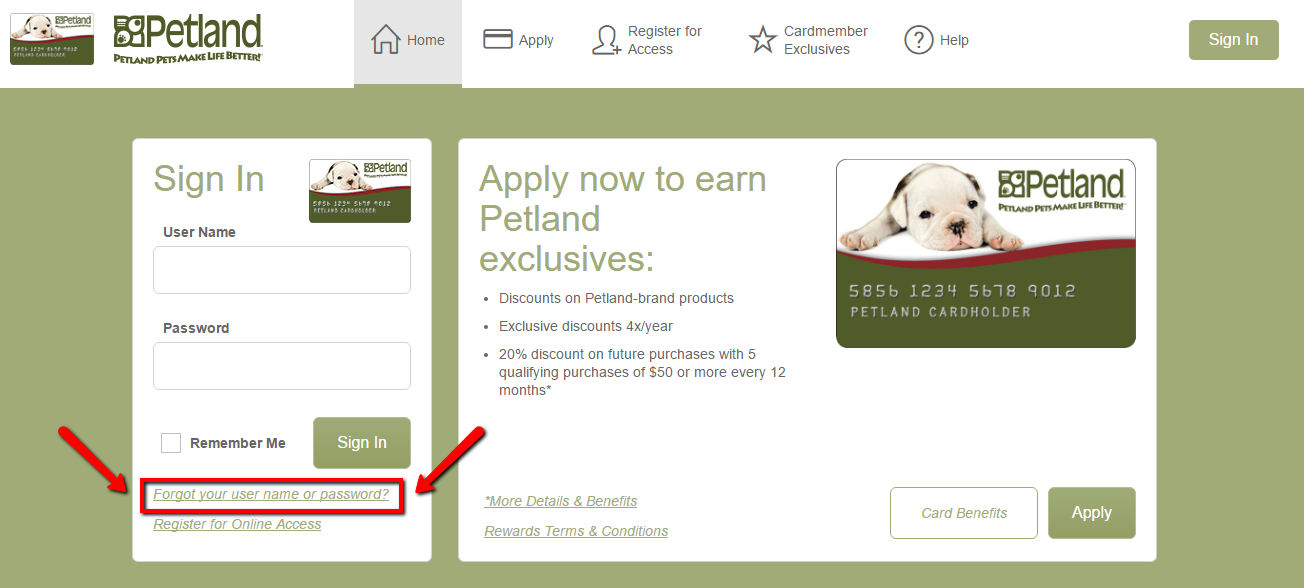
At this page, you will see a “Forgot your username or password?” link.
It’s located just under the “Log In” button. Click on it.
Step 3
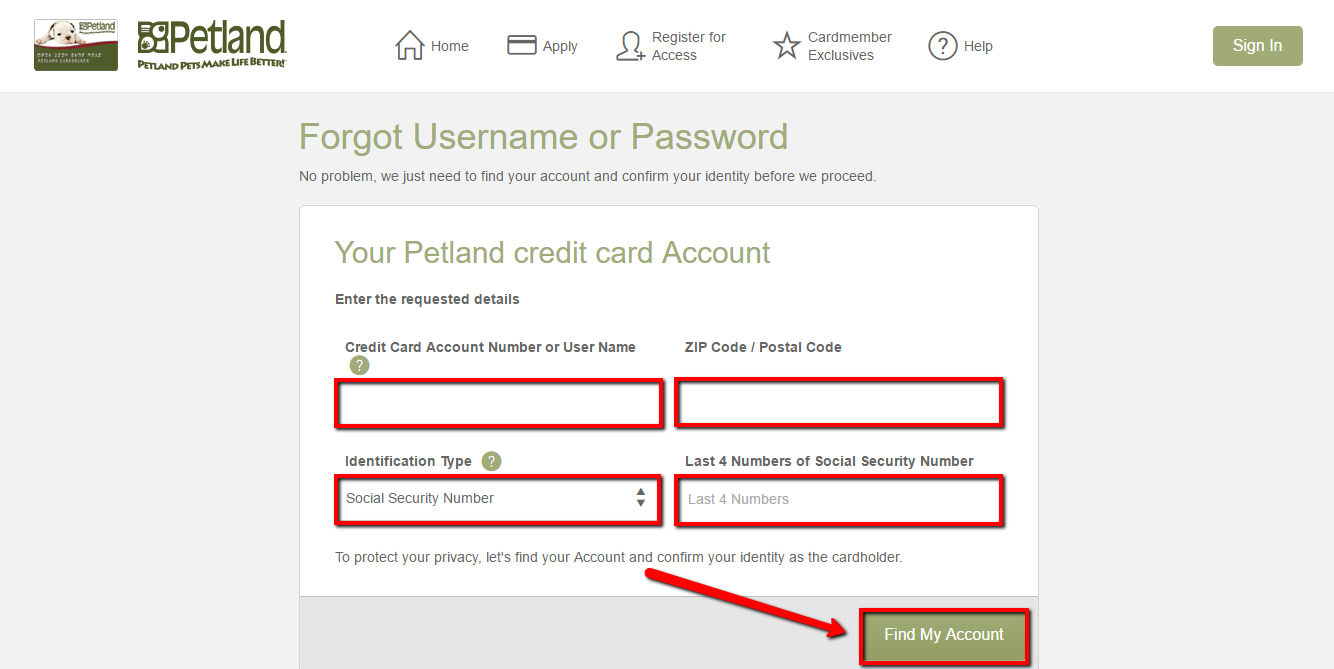
You will be redirected to the recovery page. You will see 4 fields to fill. It will be your credit card number, zip code, identification type and 4 last numbers from your SSN.
After that, click on “Find My Account” button and you will be redirected to the page with your username. Also, the system will require a new password from you.
Activation / Registration
If you have just got Petland credit card, you need to activate it. Follow the instructions below to see how to do it.
Step 1
Visit the official website of Petland credit card. You can use the link below:
https://d.comenity.net/petland/
Step 2
At the bottom of the left side, you will see “Register for Online Access” button. Click on it.

Step 3
You will be redirected to the registration page of Petland credit card. It will be very fast. You will be needed to fill your credit card number, zip code, identification type and last 4 numbers from your SSN.
Then click on “Find My Account” button. That’s all, you’ve just registered your Petland credit card.

FAQs
Q: What is Petland?
Petland represents a privately owned company of pet stores based in Chillicothe, Ohio, founded in 1967. Nowadays, Petland operates 131 stores in the United States, and 63 in foreign countries such as South Africa, Canada, Japan, China, Mexico and Brazil. The company sells birds, fish, small animals, puppies, and kittens and wholesale pet-related merchandise. It is the leader in the area of animal care with ongoing staff training programs and community service programs aimed at placing homeless pets and helping thousands of families adopt new pets into their homes.
Q: What are the points for special offers?
The owners of Petland credit card can get a chance from time to time to enjoy the special offers and earn additional Points for Net Eligible Purchases. These additional points are called Bonus Points and you may have to register to qualify for the offer. In order to get the bonus points, your Net Eligible Purchase must be charged to your Account during the special offer period. To be eligible to accumulate Points, your Account must be in good standing, which means that your Account is open to new charges and is not flagged as lost, stolen, or fraudulent according to Bank’s records.
Permium Credit Card Offers
Compare Petland Credit Card
Recently Compared With (by users)
 Bank of America® Travel Rewards Visa® Credit Card
 Celebrity Cruises Visa Credit Card
 Farm Sanctuary Credit Card
 Diamond Resorts Credit Card
 CFCU Visa Classic Credit Card
 Affinity Credit Union Low Fee MasterCard
 Royal Caribbean Visa Credit Card
 Chase Ink Plus Business Credit Card
See All Comparisons >>
Chase Ink Plus Business Credit Card
See All Comparisons >>


