


State Farm Bank Business Visa Credit Card Login | Make a Payment
 Card Info
 Application
Card Rating
Share Your Opinion
Review this card now and let others know your thoughts.
Click here to leave a reviewHolders of the State Farm Bank Business Visa Credit Card can manage their account, make transactions and pay the bills entirely online by simply logging in to their online banking account. If you have concerns on the login method, forgot your User ID/password or want to activate your card, this step-by-step guide is made for you.
How to Login / Make a Payment
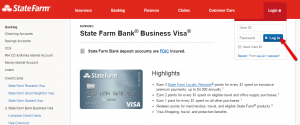
Step 1: From the card’s homepage direct the mouse pointer to the ‘Log In’ button. This will display a small window where you can insert your username and password. Press the ‘Log In’ button to access your account.
Forgot Password / Username
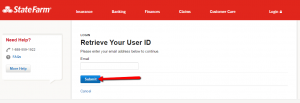
Step 1 (User ID): Navigate to the login window and click on the ‘Forgot your ID’ link.

Step 2 (User ID): Introduce in the appropriate field your email address and press ‘Submit’ to retrieve your ID.
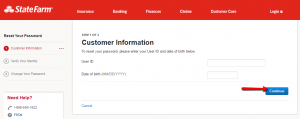
Step 1 (Password): Navigate to the login window and click on the ‘Forgot your password’ link.

Step 2 (Password): Enter in the boxes provided your User ID and Date of Birth and press ‘Continue.’ Next, you’ll be asked to verify your identity and finally change your Password for accessing your online account.
Activation / Registration
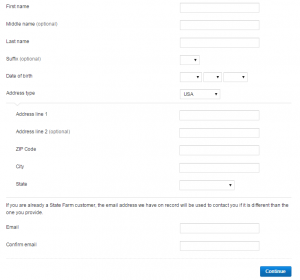
Step 1: Open the small login window and click on the ‘Register’ link.
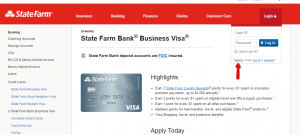
Step 2: Introduce your personal information including: First and Last Name, Date of Birth, Address Type (Street, ZIP Code, City and State) and your Email Address. Press ‘Continue’ to proceed to the next page where you can choose your user ID and Password as well as verify your identity.
FAQs
Q: Can the points be bought?
Yes, there is an option of buying points with your State Farm Bank Business Visa credit card up to a monthly maximum of 20,000 points. The rate for purchasing points can be found on the State Farm Loyalty Rewards Program website at statefarm.com or you can get informed about it by calling the phone number 877-SF4-VISA (877-734-8472). The cost per point is established by the issuer and may change without prior notice. The issuer will inform you about the current cost per point when you are buying points. The only way of purchasing them is by a State Farm Bank Business Visa credit card.
Q: Who is the State Farm Bank Business Visa card for?
The State Farm Bank Business Visa credit card is good for people who spend a lot on insurance and want to get rewarded for their payments, who are already a frequent State Farm customer and want to maximize the card’s benefits and who would rather use points for bills than to purchase card rewards.
Q: Can the credit card be customized by myself?
Yes, there is an option for customizing your credit card and all you need to do is to visit the official credit card issuer website, enter the required account information and look for the option related to the card design and customization. When you click “Preview” you can see how the card will look like.
Permium Credit Card Offers
Compare State Farm Bank Business Visa Credit Card
Recently Compared With (by users)
 Merrill Lynch Credit Card
 Bass Pro Shops Outdoor Rewards Credit Card
 Amex Blue Cash Everyday Credit Card
 Arvest Classic Visa Credit Card
 Animal Friends Visa Credit Card
 AT&T Access More Citi Credit Card
 Best Western Rewards MasterCard
 Carnival Cruises Credit Card
See All Comparisons >>
Carnival Cruises Credit Card
See All Comparisons >>


