


Susan G. Komen BankAmericard Credit Card Login | Make a Payment
 Card Info
 Application
Card Rating
Share Your Opinion
Review this card now and let others know your thoughts.
Click here to leave a reviewCardholders of the Susan G. Komen BankAmericard can manage their account by simply logging in to their online banking account. In case you have problems logging in to your online banking account, forgot your username or password or simply want to activate your new card here we will guide you through these steps.
How to Login / Make a Payment
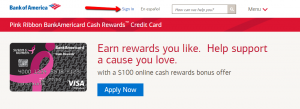
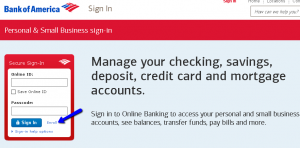
Step 1: From the card’s main webpage click on the ‘Sign in’ button. You’ll be directed to another window where you’ll be asked to provide your credentials (Online ID and Passcode) for your secure Sign-in.
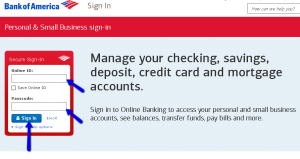
Step 2: Provide your Online ID and Passcode in the appropriate spaces and click the ‘Sign-in’ button.
Forgot Password / Username
If you forgot your Online ID and Passcode, with Bank of America’s secure sign-in it is easy to recover/reset them. Here are some simple steps you have to follow:
Step 1: Navigate to the Bank of America Sign-in page and click on the ‘Sign-in help options.’ This will open up the three options including ‘Forgot your Online ID?’, ‘Forgot your Passcode?’, and ‘Forgot Online ID & Passcode?’.
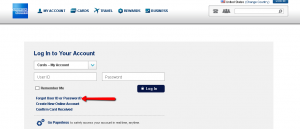
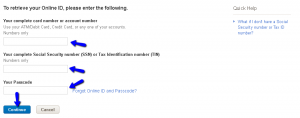
Step 2 (Online ID): Press the ‘Forgot your Online ID?’ button. In the new window provide your 1) ATM/Debit Cardnumber, Credit Cardnumber, or any one of your accounts number, 2) your complete Social Security number (SSN)/Tax Identification number (TIN) and 3) your Passcode. Click ‘Continue’.
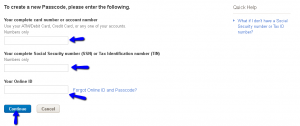
Step 3 (Passcode): Click on the ‘Forgot your Passcode?’ button. Provide your 1) your ATM/Debit Cardnumber, Credit Cardnumber, or any of your accounts number, 2) your complete Social Security number (SSN)/Tax Identification number (TIN) and 3) your Online ID. Click ‘Continue.’
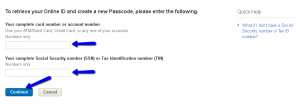
Step 4 (Online ID and Passcode): Should you forget both your credentials, click on ‘Forgot Online ID and Passcode’ in the same Sign-in page and introduce 1) your ATM/Debit Cardnumber, Credit Cardnumber, or any of your accounts number, 2) your full Social Security number (SSN)/Tax Identification number (TIN), and then click ‘Continue.’
Activation / Registration
Here are the steps to get started with your online banking.
Step 1: From the Sign-in page click on the ‘Enroll’ button. This will open the new page for creating your online banking account.
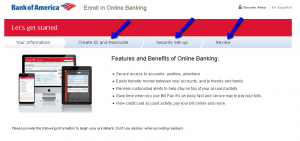
Step 2: Enter the required information in the appropriate spaces including 1) Your complete card number or account number (you can use any one of your accounts, credit card or ATM/debit card number), 2) your Social Security number (SSN) or Tax Identification number (TIN), and then click on the ‘Continue’ button.

Step 3: You’ll be asked to create your unique Online ID and your Passcode for future accessing your online banking. After that you can set up your security questions and review your provided data.
FAQs
Q: What are the additional contributions when using the Susan G. Komen BankAmericard Credit Card for purchases?
There are Susan G. Komen Donations together with the Bank of America who is contributing 0.08% of every card transaction to the foundation plus it donates an additional $3 to the foundation for every new card it issues, as well as $3 for every card renewal it processes, provided the account is in good standing and does not have a $0 balance at renewal. That way, by using your Susan G. Komen BankAmericard Credit Card, you help fight breast cancer as Susan G. Komen organization receives $3 and 0.08% of all retail purchases made with the card.
Q: When I try to get access to my online account there seems to be a problem?
It sometimes happens that people are having problem when they try to access the account online. There might be issues with the website itself, due to some changes and improvements that might be applying at that particular moment. You should try later again. Another possibility is that your browser is not updated to a more recent version. In order to get the best view of the pages, it is necessary to have the latest version of the browser you are using. If both of these are not in question, you can always contact the customer service and ask for help.
Permium Credit Card Offers
Compare Susan G. Komen BankAmericard Credit Card
Recently Compared With (by users)
 Westpac Altitude Credit Card
 Central Bank ONLY Card MasterCard
 American Express® Green Card
 Affinity Credit Union Student Choice Rewards MasterCard
 Chase Ink Cash Business Credit Card
 Discount Tire Credit Card
 Wells Fargo Propel American Express Card
 Hyatt Credit Card
See All Comparisons >>
Hyatt Credit Card
See All Comparisons >>


