


Discover it Chrome Student Credit Card Login | Make a Payment
 Card Info
 Application
Card Rating
Share Your Opinion
Review this card now and let others know your thoughts.
Click here to leave a reviewThe Discover It Chrome Student Credit Card provides a generous cash back rewards system and no introductory interest. You can also easily manage your account and make payments through an online platform. On this page, we will show you how to log in, how to retrieve your credentials and how to create a new account.
How to Login / Make a Payment
If you already have an online account associated with your Discover It Chrome Student card, here is what you have to do in order to access it:
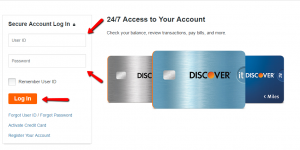
Step 1: Open the credit card’s login page, introduce your User ID and Password and click “Log In”.
Forgot Password / Username
In case you forgot your User ID or password, here is how to retrieve them in a few very simple steps:
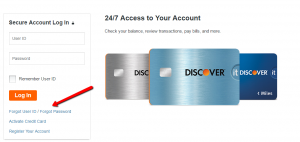
Step 1: In the card’s login page click on ‘Forgot User ID’ or ‘Forgot Password.’
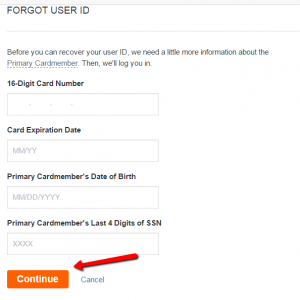
Step 2 (User ID): In case you forgot your User ID, provide in the required fields your 16-digit card number, your card’s expiration date, your date of birth and last four digits of his/her social security number (in case you are the primary cardmember).
Afterwards, click on the ‘Continue’ button.
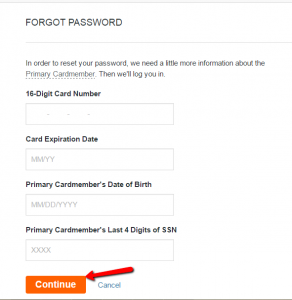
Step 2 (Password): If you forgot your password, introduce in the required fields your card’s 16-digit card number and expiration date, and if you are the primary cardmember, your date of birth and last four digits of your social security number and press ‘Continue.’
Activation / Registration
If you acquired a Discover It Chrome Student Credit Card but you did not yet set up an online account, below we will show you how to activate and register your card.
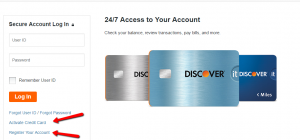
Step 1: In a first step, you will have to activate your card. To begin this process, click on ‘Activate Credit Card’ in the login page.
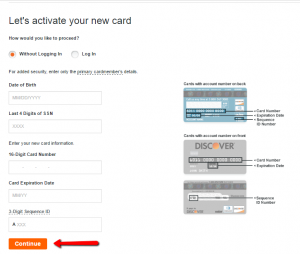
Step 2: Introduce your date of birth, the last 4 digits of your social security number, your credit card’s number/expiration date, the card’s 3-digits sequence ID and click on ‘Continue.’
After activating your card, return to the login web page and click on the ‘Register Your Account’ button.
Step 3: In the newly opened page, press ‘Register Now’ under ‘Credit Cards.’

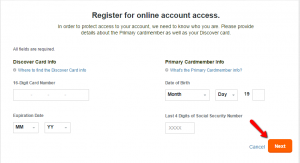
Step 4: Enter your 16 digit card number and expiration date, your date of birth and the last 4 digits of your social security number.
Finally, click ‘Next’ to complete the registration process.
FAQs
Q: Is it obligatory to enter total annual income when applying for Discover it Chrome Student Credit Card?
Yes, it is. One of the conditions when applying for Discover it Chrome Student Credit Card is to include your total annual gross income, that is, the amount of money that you earn in a year without the taxes. It is obligatory because that way the issuer determines whether to issue a card to you or not, so it is advisable to enter the correct amount since that can be checked. So as to get the Discover it Chrome Student Credit Card, a stable income is necessary.
Q: What does “Freeze it” stand for?
Discover it Chrome Student Credit Card offers you the chance of freezing your account, meaning that Discover will not allow any new purchases, cash advances or balance transfers which can affect your credit amount, but some other types of activity will continue to normally function such as returns, credits, rewards redemptions, etc. The freezing of your account is available in seconds via the mobile application or website since there is an on/off switch used to prevent any further purchases.
Q: I applied for Discover it Chrome Student Credit Card so as to build credit responsibly. How can I do that?
Building credit responsibly is a simple process and all you need to do is to make all payments on-time, pay your balance in full, or at least try to pay more than your minimum each month and avoid carrying a balance in order to avoid paying interest.
Permium Credit Card Offers
Compare Discover it Chrome Student Credit Card
Recently Compared With (by users)
 Affinity Credit Union No Fee Choice Rewards MasterCard
 Hawaiian Airlines Credit Card
 Ace Hardware Rewards Visa Credit Card
 Virgin Atlantic MasterCard Credit Card
 ABC Warehouse Credit Card
 Target Red Card Credit Card
 USAA Rewards Visa Signature Card
 Zions AmaZing Cash Back Credit Card
See All Comparisons >>
Zions AmaZing Cash Back Credit Card
See All Comparisons >>


