


ASU Rewards Credit Card Login | Make a Payment
 Card Info
 Application
Card Rating
Share Your Opinion
Review this card now and let others know your thoughts.
Click here to leave a reviewThe ASU Rewards Credit Card can be managed entirely online from your own PC. In case any issues with your online access should arise, our guide offers information on the online login procedure, password assistance and first enrollment to online banking.
How to Login / Make a Payment
If you have already opened an online account connected to your MidFirst Bank ASU Rewards Credit Card, here are the steps to access it:
Step 1: Open the card’s homepage or the MidFirst Bank main webpage and enter your online Banking ID in the available box located at the top of your screen. Afterwards click on the ‘Log In’ button. You may be asked to introduce your password too in another window.

Forgot Password / Username
In case you have any issues with your online banking access, you can solve them by completing the steps below:
Step 1: In case your login attempts have failed after introducing your Banking ID, a page with the methods you can follow for re-establishing access to your account (phone assistance or online assistance) will open. Press the iManage Internet Banking® Support link as shown below for online support.
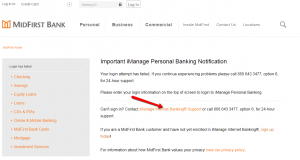
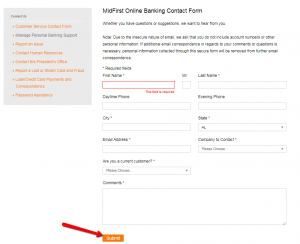
Step 2: Provide the required information in the MidFirst Online Banking Contact Form and insert your specific concern in the comments box. Click on the ‘Submit’ button to forward your inquiry to the bank.
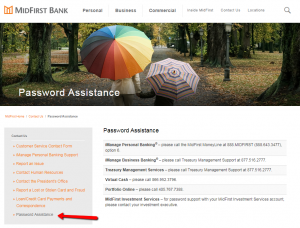
Step 3: If you have problems with your password, click the ‘Password Assistance’ button in the current window. A complete list of phone numbers you can call for assistance regarding your password will appear.
Activation / Registration
Self-Enrollment in iManage Personal Banking is easy and it can be completed by following these steps:
Step 1: Navigate to the MidFirst Bank homepage, press the Personal menu and then click on the Enroll in Online Banking option as shown in the picture below.
Step 2: Under the Bank Review Enrollment select the ‘Credit Card Account’ option. Read the iManage Personal Banking and Bill Pay Agreement and select the following box to indicate that you agree to the terms of use. Click on the ‘Continue’ button to access the enrollment page.
Step 3: Introduce in the appropriate fields the required information including your: first name, last name, last 4 digits of your social security number, email address, home address, city, state, Zip code, home phone number, mother’s maiden name, last 4 digits of your credit card’s number and the card’s expiration date, and then click the ‘Continue’ button.
Note: The Bank Review Enrollment method related to Line of Credit Account / Certificate of Deposit (CD) Account / Credit Card Account allows access with the assistance of an online banking specialist. Upon completion of your request, please contact 888.643.3477 option “6” to complete your enrollment.
FAQs
Q: What does Certificate of Deposit stand for?
A Certificate of Deposit or CD is the certificate issued by the bank where you agree to leave your money in the bank for a determined number of months or years during which time you do not have access to your money without paying a penalty. This period can be of diverse length, form a few days to even a decade. The longer the period, the higher interest rate. A certificate of deposit determines fixed maturity date, fixed interest rate and are insured by the FDIC up to $250,000.
Q: What is Midfirst bank application?
MidFirst Bank is proud of its Midfirst Bank Mobile application for Android! The application is available to all clients of MidFirst Bank, and it is made so as to enable easier and more comfortable way of checking balances, making transfers, paying bills and finding bank branches locations via mobile or tablet devices.
Q: What is a reward card?
Each and every rewards card works in the same way, meaning that you get rewards for the purchases paid by the card itself. The number of points is different for each card and the stores and services where you can get the points also differ. Rewards can be either cash back or points redeemable on airline flights. Cash back earns you the amount of money which represents a set percentage of the value of purchases you make, while airline points can be redeemed for money off airline tickets.
Permium Credit Card Offers
Compare ASU Rewards Credit Card
Recently Compared With (by users)
 HSN Credit Card
 Wells Fargo Propel 365 American Express Card
 Ashley Stewart Credit Card
 Citi ThankYou Credit Card
 Capital One® Venture® Rewards Credit Card
 Abt Electronics Credit Card
 Barnes and Noble Credit Card
 Dodge Mastercard Credit Card
See All Comparisons >>
Dodge Mastercard Credit Card
See All Comparisons >>


